

Making Care Plan Approvals Easier for U.S. PT Clinics & Referring Physicians
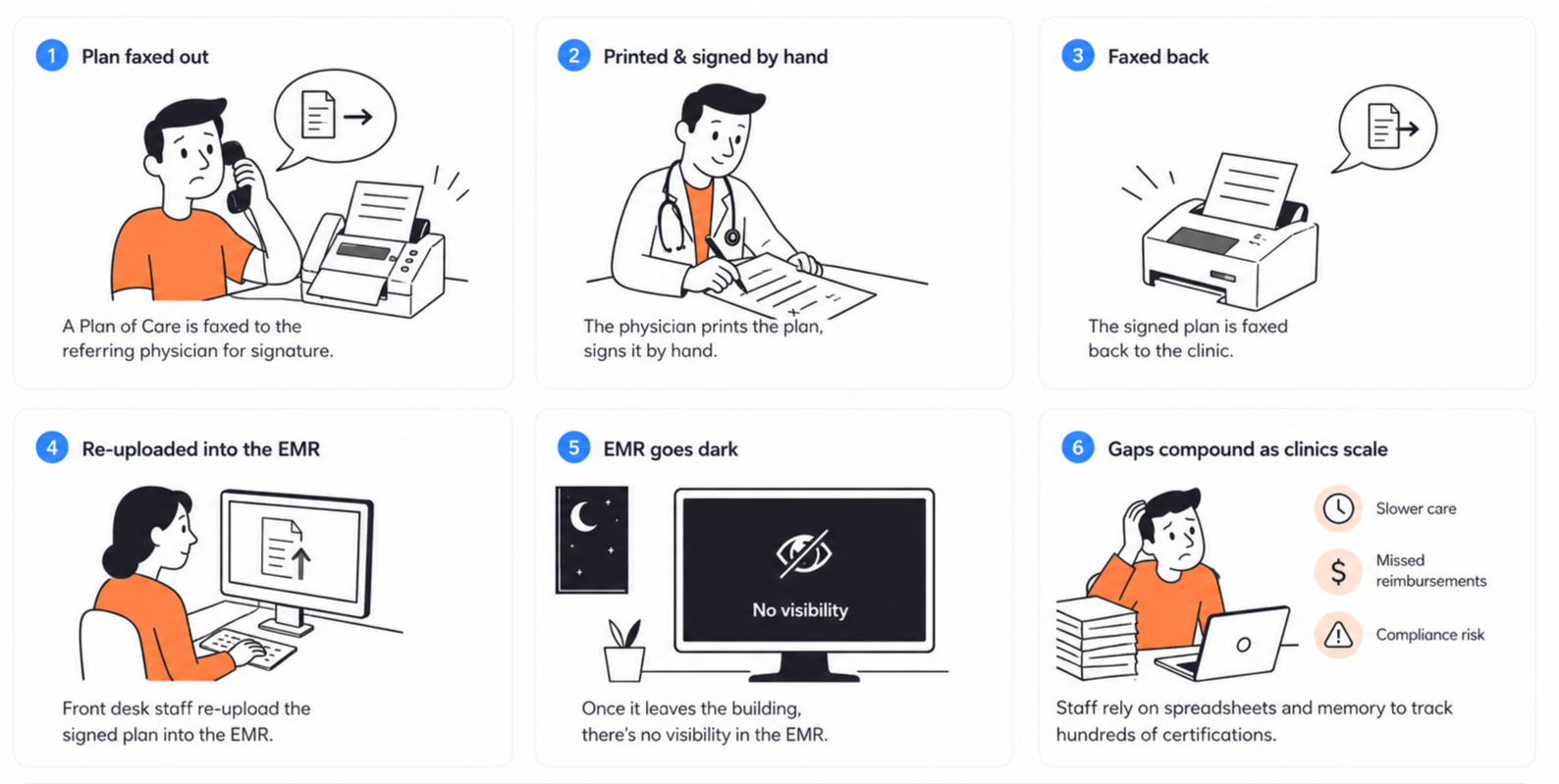
Every physical therapy treatment plan needs a referring physician's signature before care and reimbursement can continue. Clinics faxed treatment plans, physicians printed them from the fax machine, signed them by hand, faxed them back, and clinic staff manually uploaded the signed copies into the EMR. No one could see where any document stood once it was sent.
I designed a state-driven certification system that digitized physician approvals and gave clinic teams real-time visibility into every plan, from creation to signature.
Role
Responsible for end to end design
Team
Me, 1 PM, 2 Engineers, 1 QA
Timeline
3 weeks
Users
Front desk, Physical therapist, Referring physcian
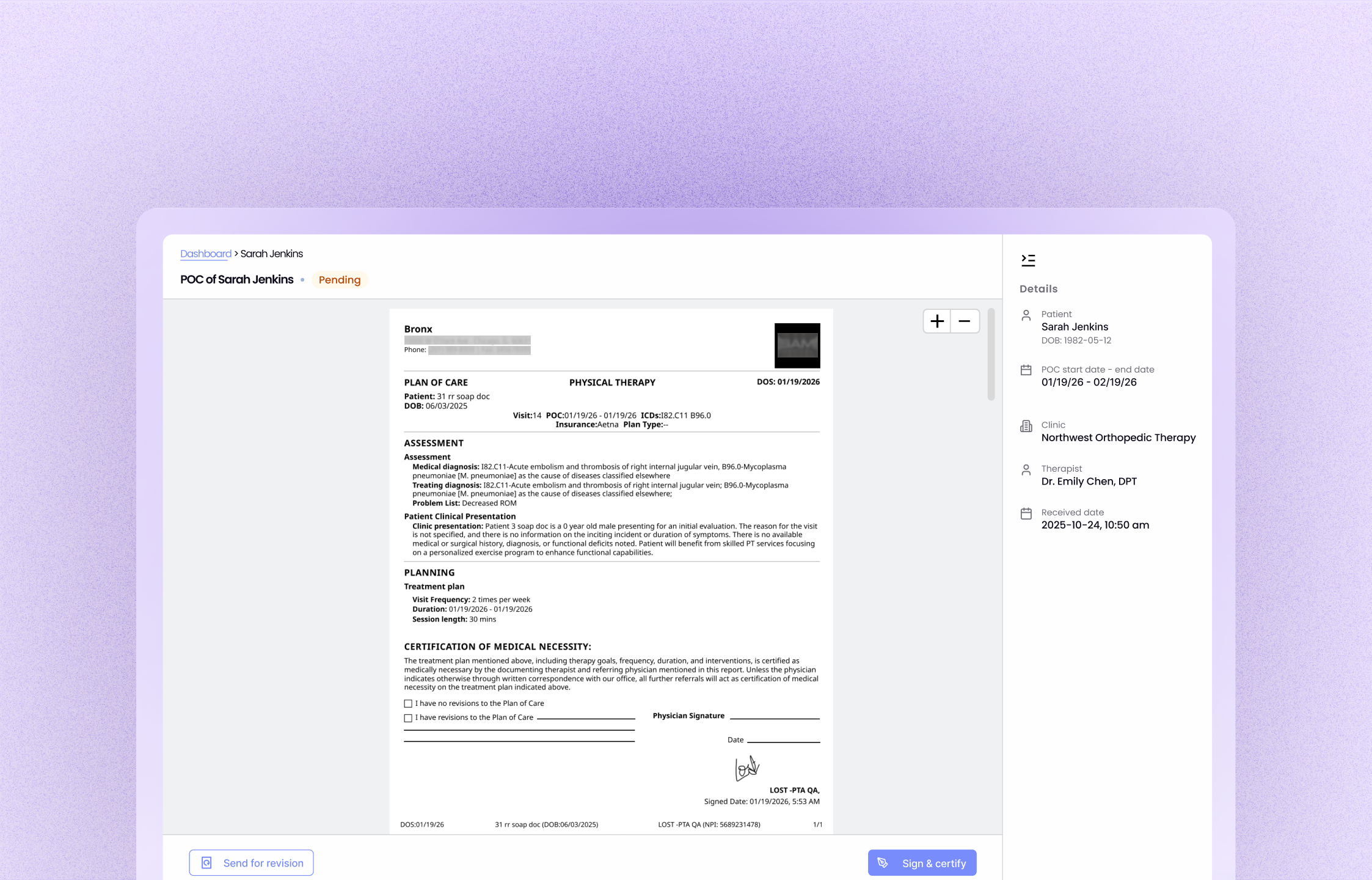
What is the plan of care POC ?
A POC is a treatment plan a physical therapist creates after evaluating a patient — diagnosis, goals, planned interventions, visit frequency, expected duration. Before treatment continues, the referring physician must review and certify it. That certification confirms the physician agrees with the plan and is required for compliance and reimbursement by many insurers.
Heavy manual effort, zero visibility into signings
The problem
POC certification was the most manual workflow in the EMR. A plan of care was faxed out by the clinic, printed and signed by hand by the referring physician, faxed back, and re-uploaded into the EMR by the front desk.
Once a plan left the EMR for signing, the system went dark. Front desk staff and therapists had no way to tell or track which plans were pending, signed, or overdue in the EMR — so they tracked hundreds of active certifications manually, the toughest part of the job for both roles.
As clinics scaled, every gap compounded: slower care, missed reimbursements, and compliance risk.
What made it hard
Auth and role-management complexity.
Signature compliance and auditability.
Real-time sync between physician and therapist views
HIPAA — secure authentication and regulatory compliance for digital signatures.
High priority: enterprise go-live blocker, 3 weeks timeline.
What success meant
Increase adoption of digital physician certification.
Reduce reliance on fax.
Strengthen competitiveness for enterprise clinics.
Reduce unsigned and delayed POCs.
Improve visibility into certification progress.
Reduce manual follow-ups by clinic staff.
Simplify physician review and signing.
Give front desk a single place to monitor every certification.
Reduce time spent tracking document status.
The document was never the bottleneck. Coordination was.
Reserch & reframe
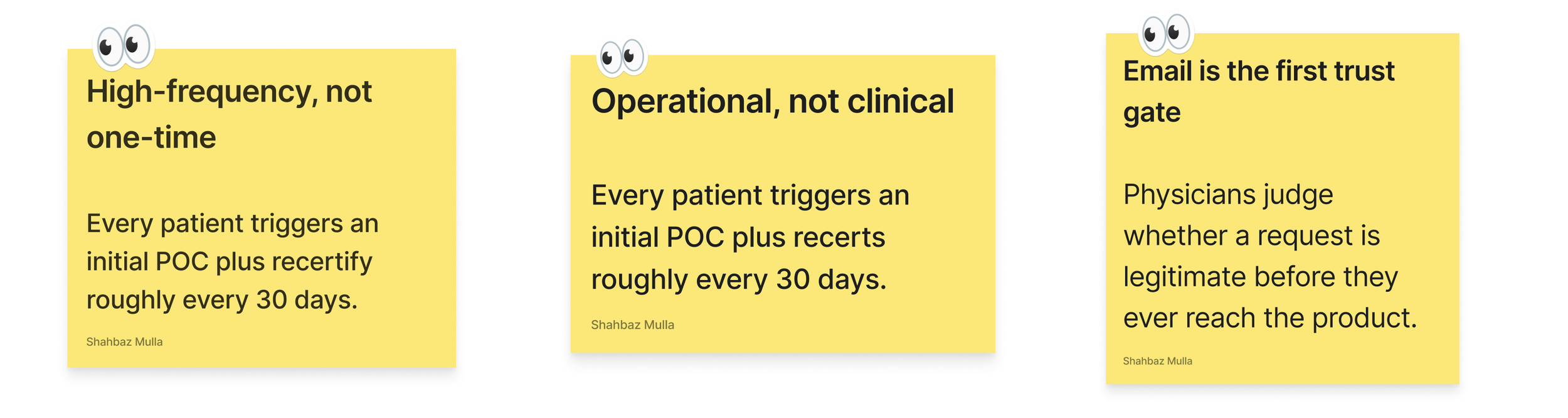
The challenge was never creating a document. It was coordinating work across four people while ownership kept shifting therapist to front desk to physician and back.
That reframe drove the entire system. Instead of designing a signing screen, I mapped the full workflow to find where ownership changed, where work stalled, and why clinics couldn't manage it at scale.
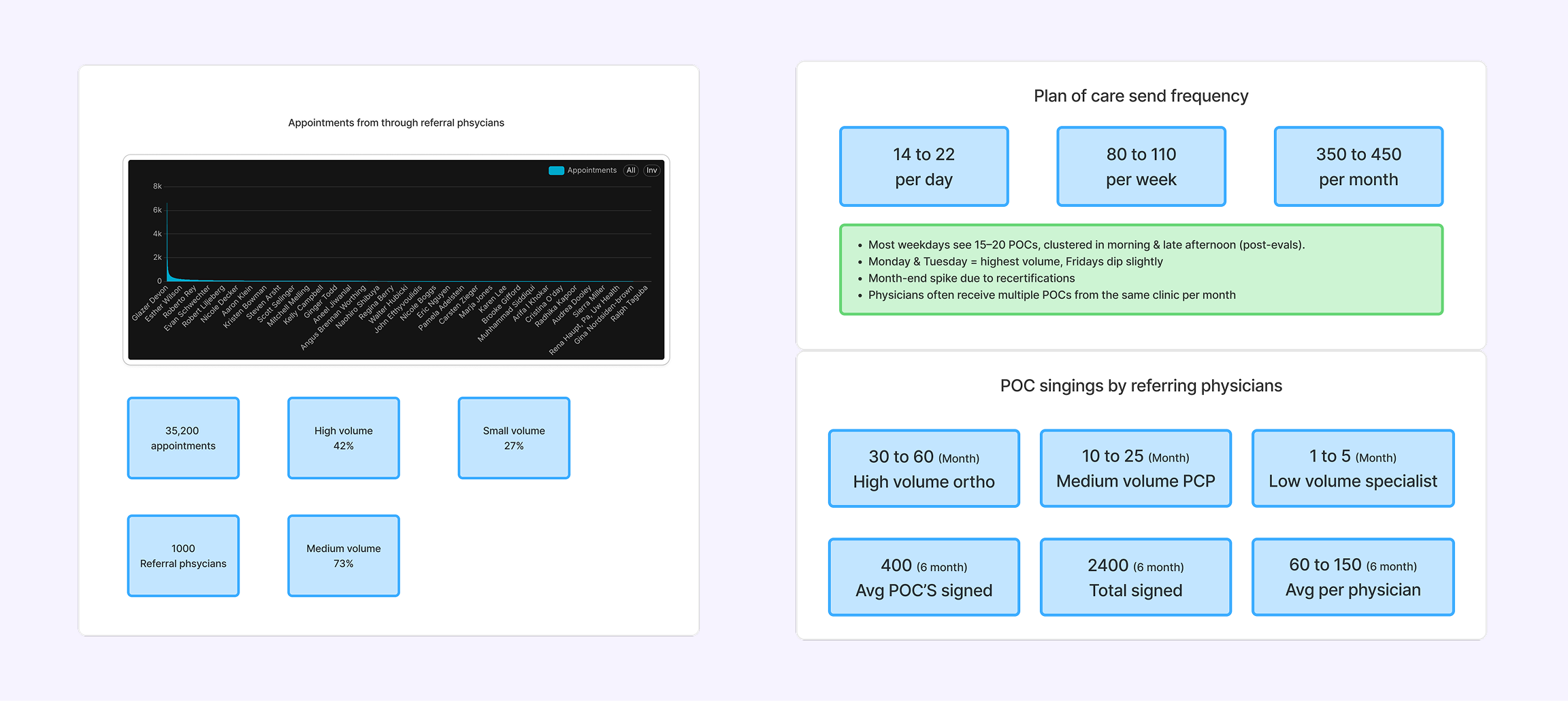
Three inputs shaped it: analytics from 35.2K+ appointments grouped by referring physician, research on outpatient PT certification, and the regulatory requirements around physician approvals.
The biggest challenge wasn't designing a signing interface—it was designing the system behind it.
A POC moves across therapists, front desk staff, physicians, email/fax, and the EMR. Each handoff changes ownership and can introduce delays or failures.
So before designing individual screens, I modeled the workflow first, so every screen, status, automation, and action followed the same logic.
System architecture
I architected the workflow before designing a single screen
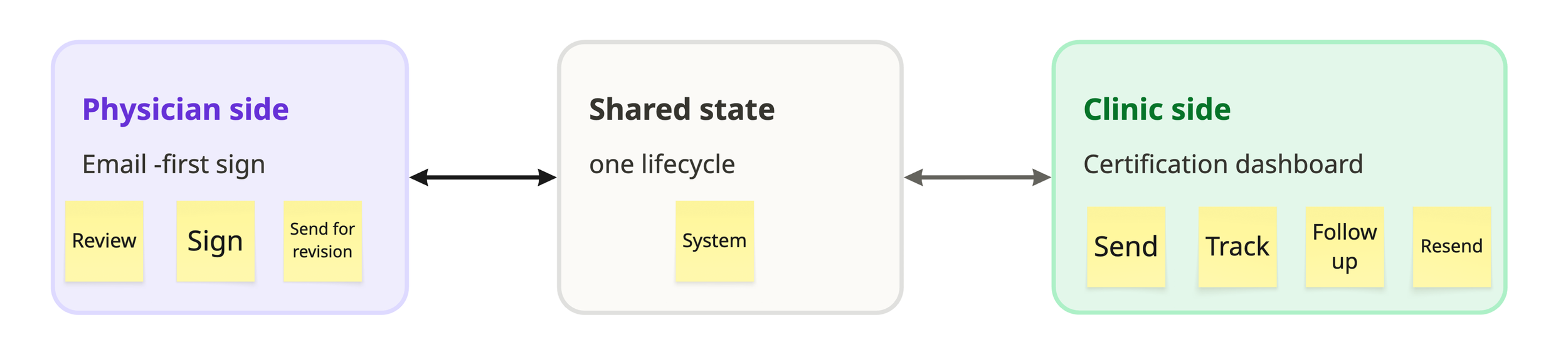
One document, two products, one lifecycle
The same lifecycle powers two very different experiences. Physicians get a fast, email-first signing flow. Clinic teams get a status-driven dashboard. Both read and write the same states — which is why a physician's signature instantly updates the front desk's view, with no fax, no phone call, no re-upload.
Choosing the Physician Entry Point
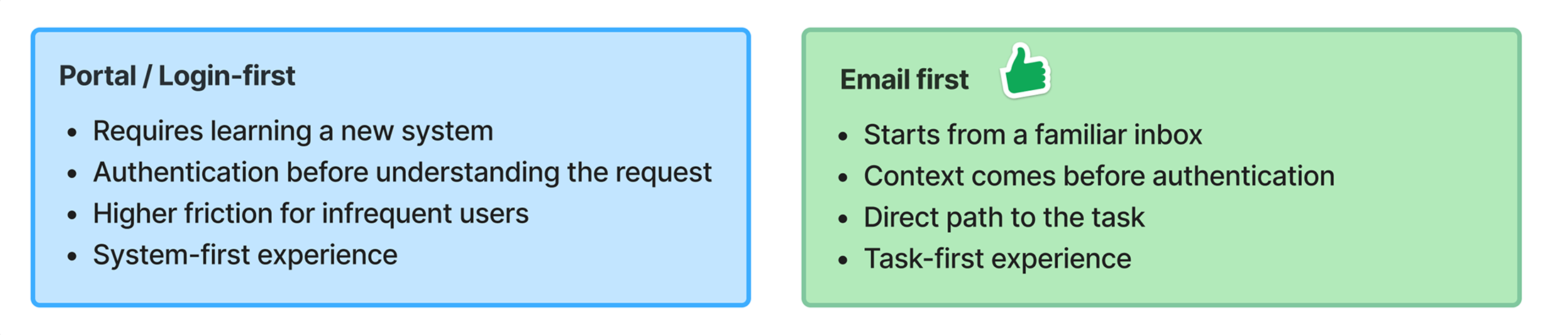
The first architectural decision was where physicians should enter the workflow. Research showed that signing a POC is usually a task physicians complete between patient visits, not a reason to regularly use another portal.
Physicians could start directly from the email they already received.
Identity verification happened only when accessing the POC.
Frequent physicians could use trusted sessions and an optional dashboard.
The experience optimized for task completion without removing security.
A state-driven lifecycle
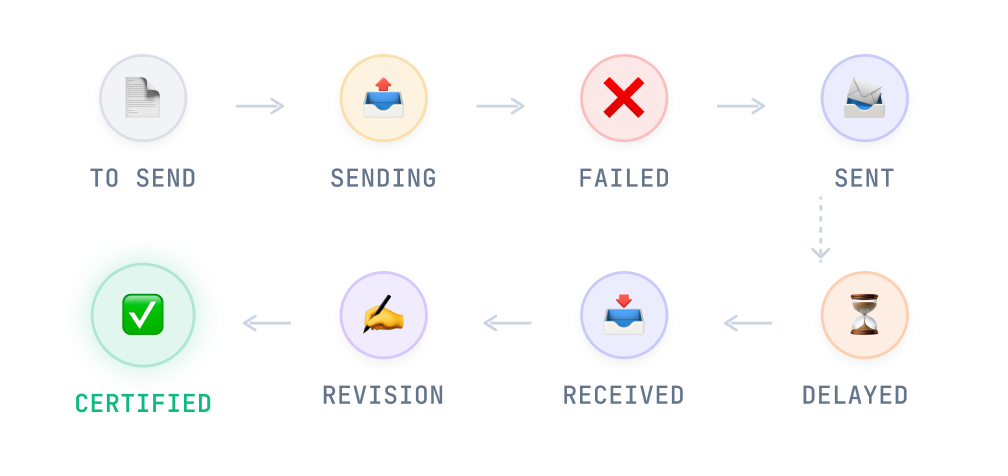
A POC moves through therapists, front desk, physicians, email, and the EMR. Each handoff changes ownership and can stall. So I built one shared state engine every surface reads from — dashboard, physician portal, notifications, reminders, and reporting all reference the same lifecycle.
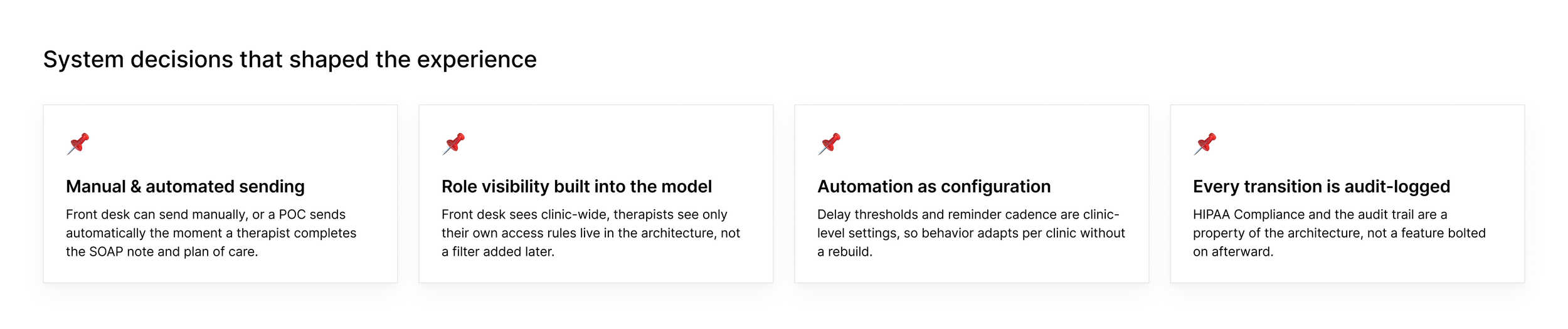
One model, four payoffs: consistent behavior across the product, simpler engineering, a reliable audit trail, and fewer operational mistakes.
Final solution
Physician experience
Email-first signing for referring physicians
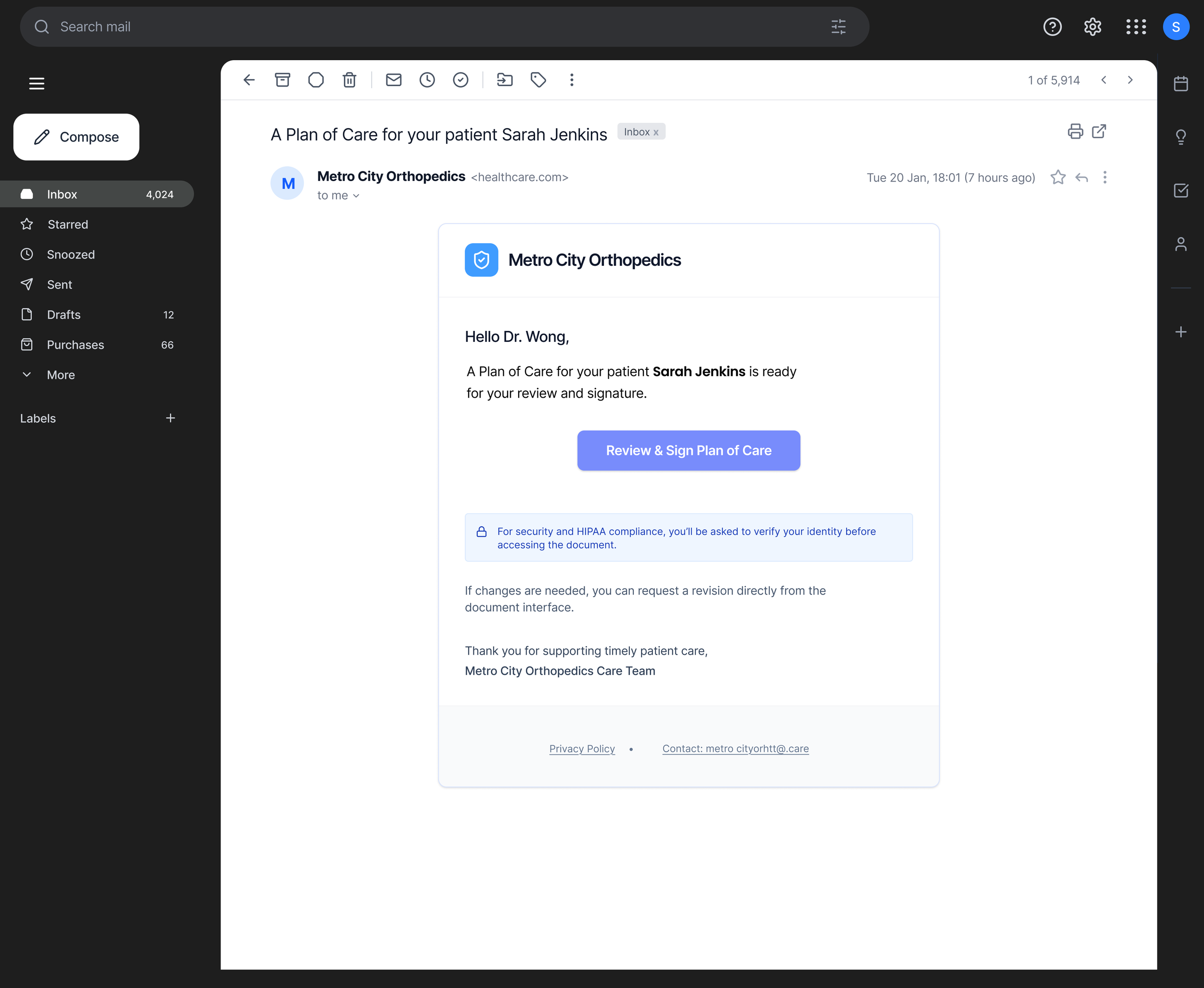
Signing a POC was never the hard part. Getting a physician to trust and complete it in the middle of a clinic day was. This flow shows the full path: email, verification, review, and signature.
The email is the product's front door
Physicians decide whether to trust a request before they open it. The email leads with one action — Review and sign — plus clinic branding and just enough context, no PHI.
One clear action — "Review and sign Plan of Care" — keeps the physician focused.
Only necessary context — clinic, patient, requested action — without unnecessary PHI in the email.
Clinic branding + security reassurance — helps the physician recognize and trust the request.
Single and digest emails — works for occasional physicians and those receiving multiple POCs.
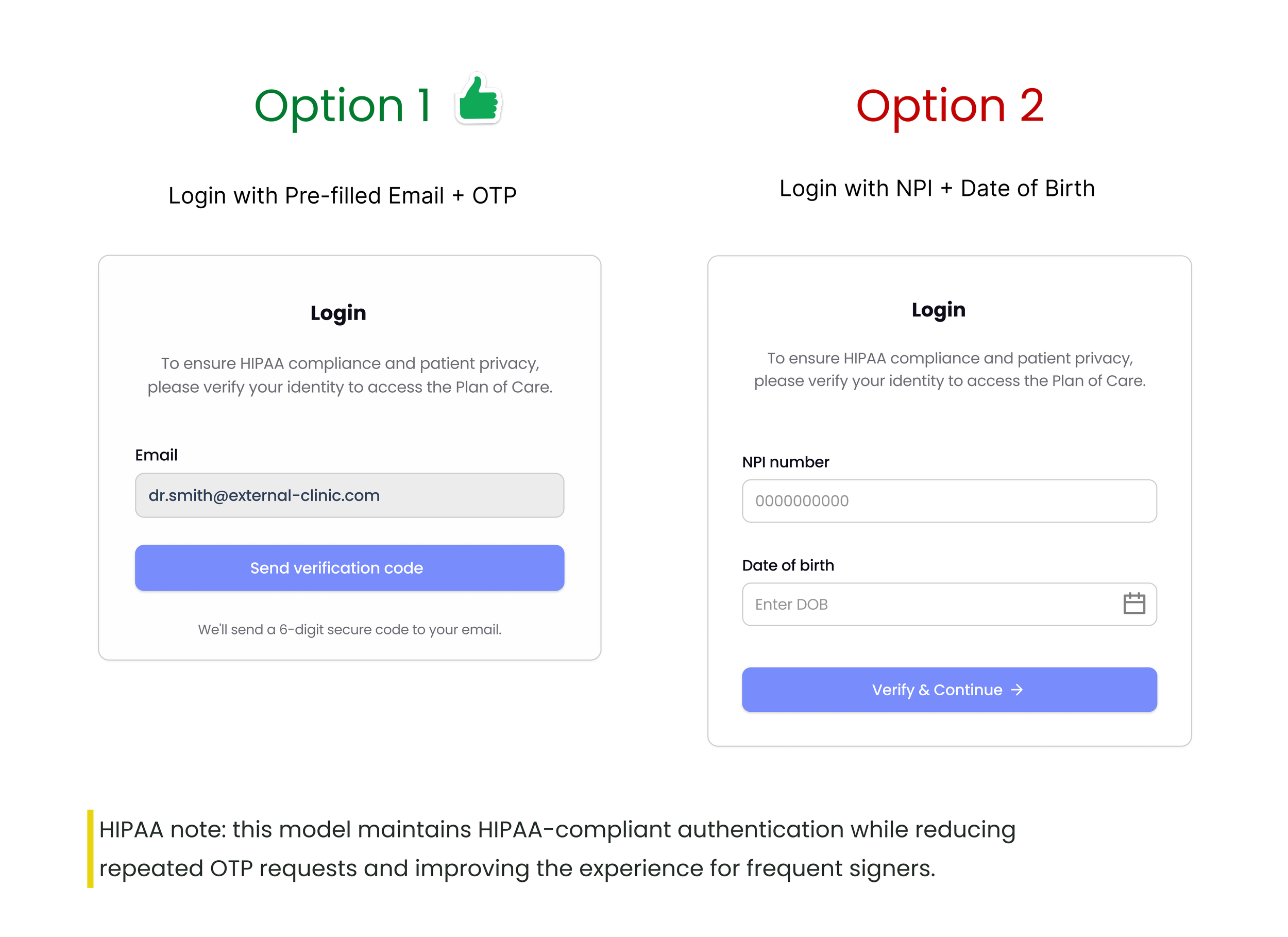
Verified identity, protected document
Trade-off :
Selected — pre-filled email + OTP (option 1)
Verification is bound to the registered recipient email, so only the intended physician can access the document; pre-filled email + OTP minimizes effort while giving stronger identity verification; 24-hour trusted sessions reduce repeated OTP requests while maintaining security and audit compliance.
Rejected — NPI + date of birth (option 2)
NPI is a public identifier and DOB is a weak factor, giving lower identity assurance; auth wasn't tied to the recipient email, raising unauthorized-access risk; required manual entry of two fields, adding friction before review.
Physicians rarely have EMR accounts, so authentication was the highest-risk drop-off point. I chose email-bound OTP with 24-hour trusted sessions stronger identity assurance, far fewer OTP interruptions for frequent signers.
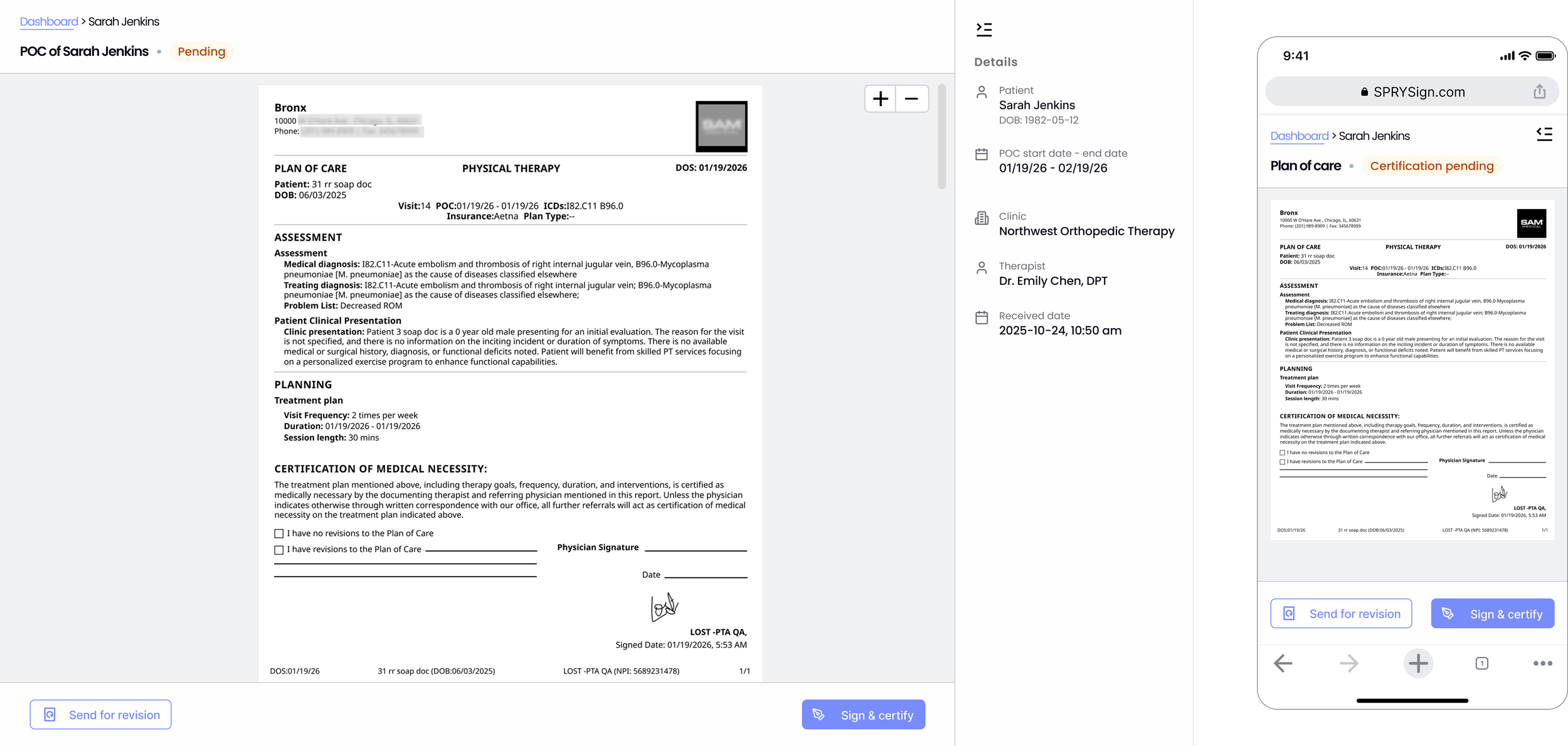
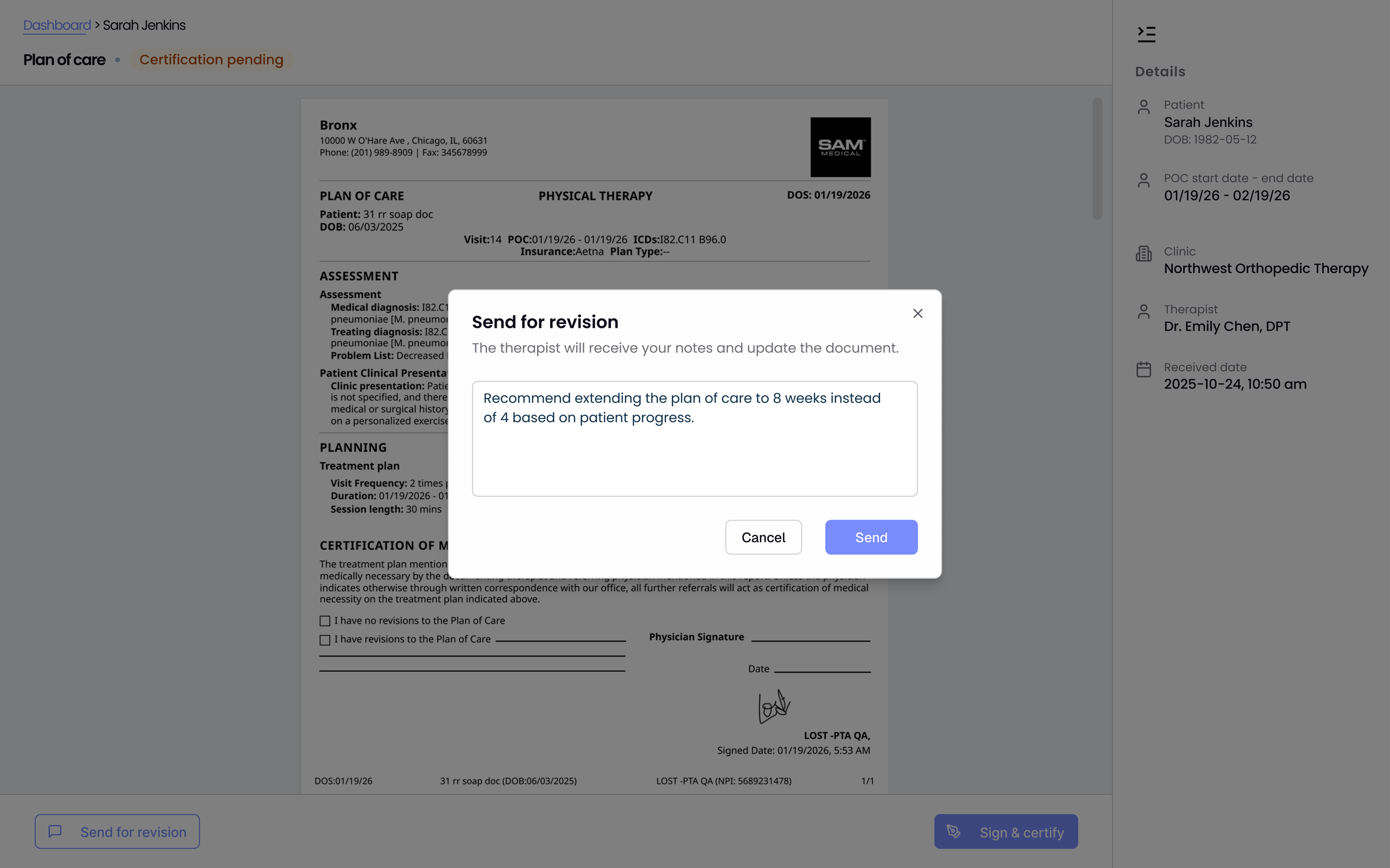
I kept the original POC layout physicians already know, pinned patient and visit details in a fixed side panel, and reduced the screen to two actions: sign and certify, or send for revision. Mobile-first, because this happens between patient visits.
Preserved the original POC layout to match the paper document physicians already review lower learning curve, more trust.
Patient and visit details in a fixed side panel — verify context without searching the details in the document.
Only two primary actions, sign and certify, or Send for revision — next step is immediately clear.
Document zoom and scrolling, review clinical content comfortably without leaving the page.
Document status shown prominently, immediate context before acting.
Mobile-first readable document, key actions within reach between patient visits.
Review with confidence, sign in two taps
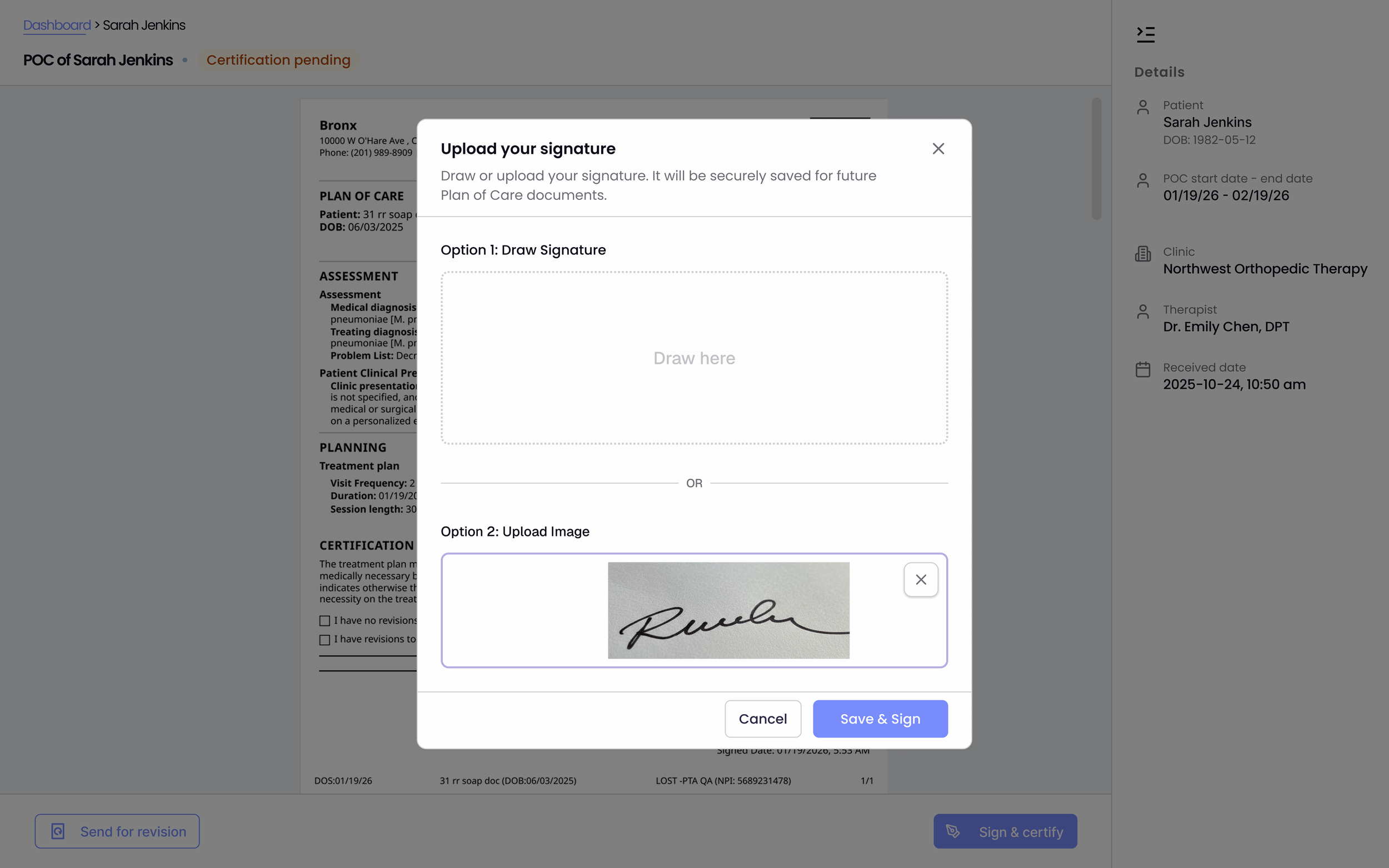
Physicians sign multiple POCs a month, so re-drawing or re-uploading a signature every time adds friction. A saved, reusable signature applied in one tap, with a full audit trail.
Saved signature reused across documents without redrawing.
Signature bound to the authenticated session for audit compliance.
Applied inline at the point of certification, no separate step.
Upload signature once, applied automatically after
Structured revision notes go straight back to the therapist and flip the plan to Revision needed — no calls, no fax annotations, full history preserved.
Request revisions directly from the document, keeping feedback in the same workflow.
Revision notes captured as structured comments so therapists know exactly what to change.
Document auto-returns to the clinic and status updates to "Revision needed," triggering the next step without manual coordination.
Complete revision history preserved — a clear audit trail for clinics and physicians.
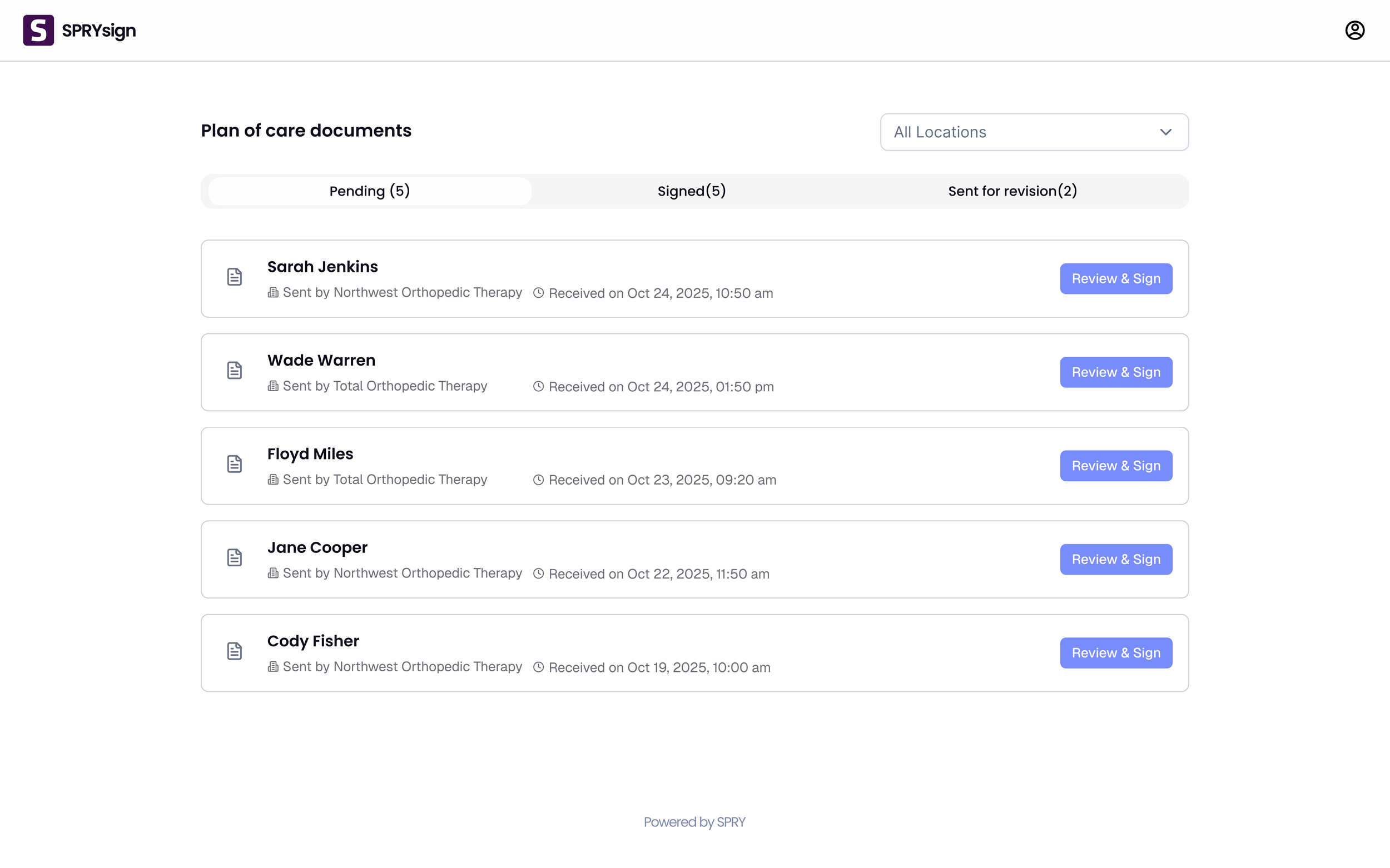
Dashboard as a secondary access point, so physicians can keep reviewing assigned POCs after the first email invitation.
Organized by workflow status (Pending, Signed, Sent for revision) to quickly identify what needs action.
Key context in the list — patient name, clinic location, received date — reducing the need to open each document.
Location filter to switch between practice locations within one clinic organization.
"Review and sign" kept as the primary action.
A secondary entry point for high-volume physicians — documents grouped by status, filterable by location, Review and sign always primary.
Clinic Experience
The day's certification work, visible before you go looking for it
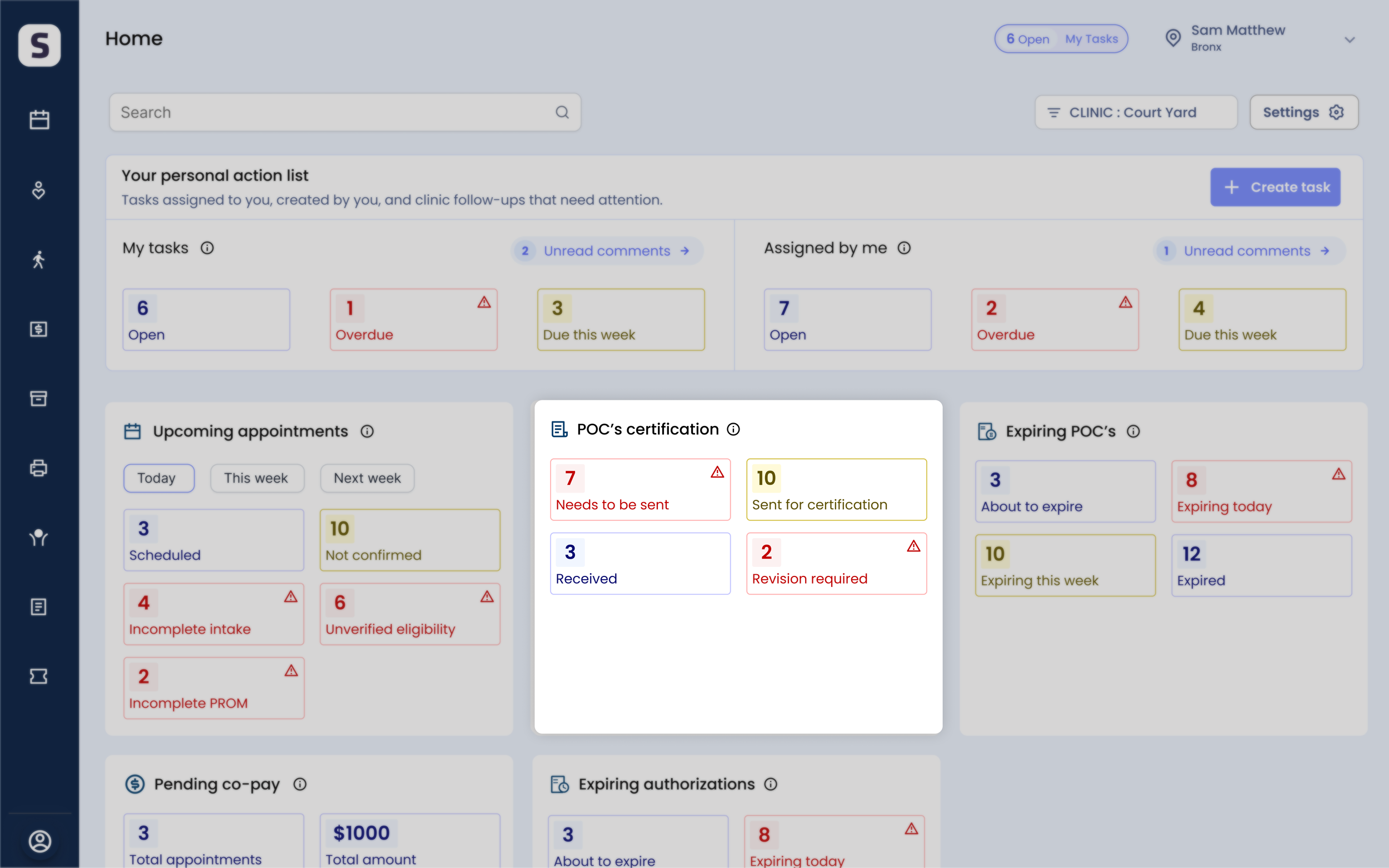
Staff had to manually check patient records to find which POCs needed attention. I added a role-based certification tile to the home dashboard, so the moment someone logs in, the work that needs action is already in front of them — no searching required.
Role-based visibility: front desk sees clinic-wide POCs needing follow-up, therapists see only POCs requiring their clinical action.
Turns certification from work staff searched for into work they see, prioritize, and act on immediately.
Faster follow-up, less manual tracking, better visibility into certification progress.
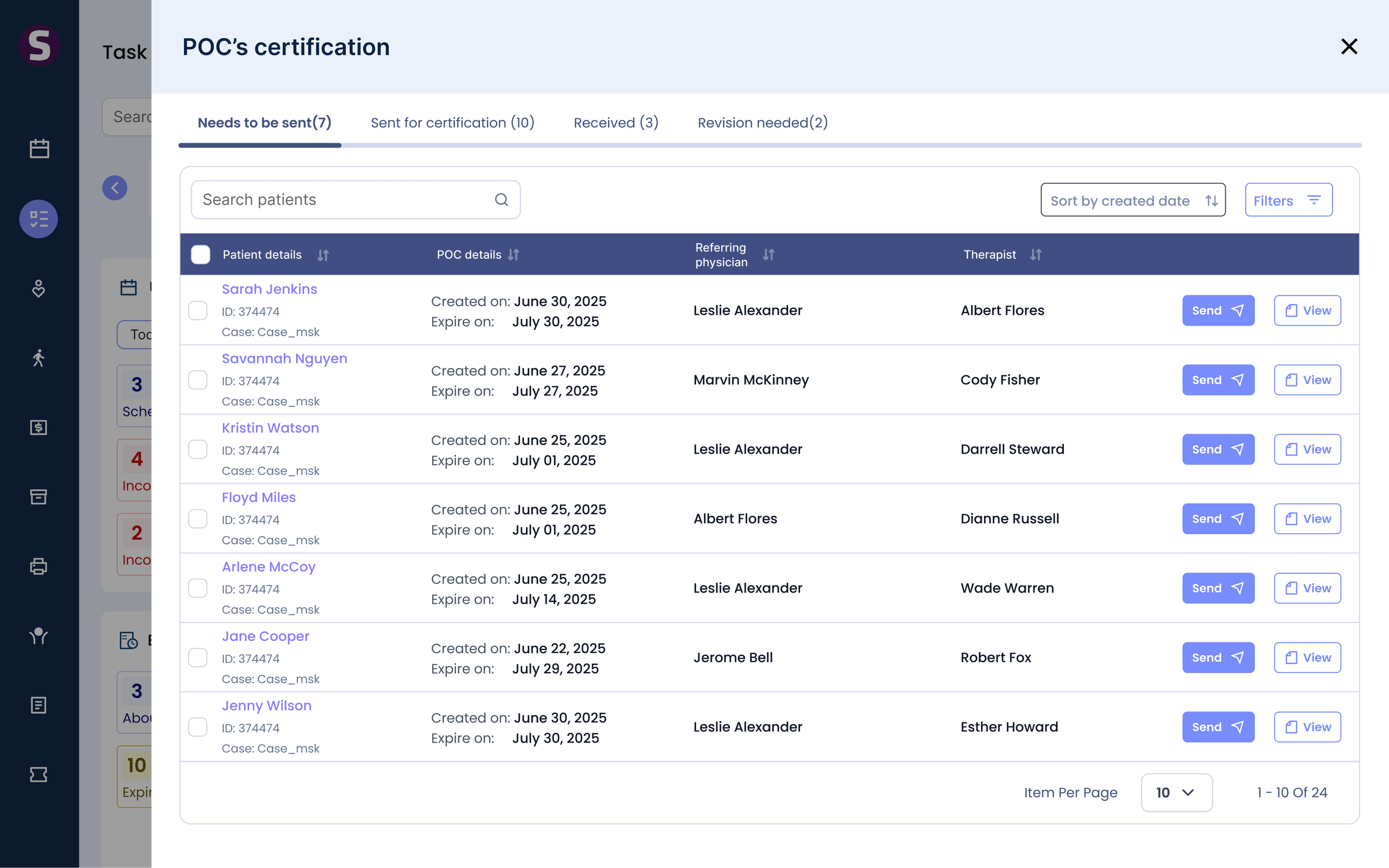
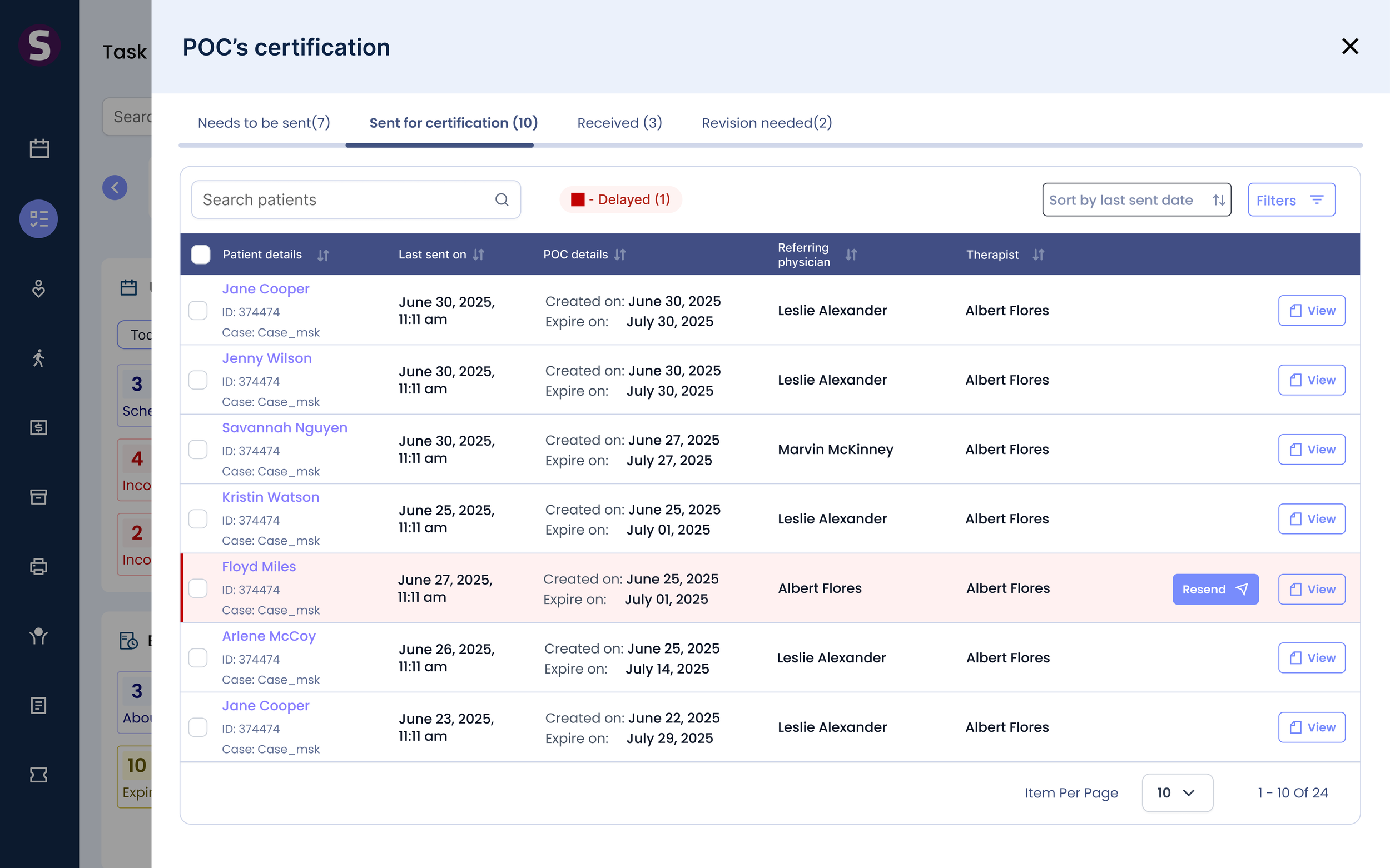
Staff were searching across records, spreadsheets, emails, and fax. Research showed they manage this work by status, not by patient — so the dashboard is built on status buckets: needs to be sent, sent for certification, received, revision needed. The table shows only what's needed to decide the next action, and every action happens in context.
One place to see every certification
Status-based buckets match how staff prioritize work.
Decision-focused table — patient, POC, physician, therapist, action — only what's needed to decide next.
Shared certification states keep status and actions consistent across the EMR.
Actions in context — Send, Resend, Mark certified, View — without leaving the workflow.
Search, sort, and filters help high-volume clinics find priority POCs fast.
The system chases follow-ups, not the staff
Configurable delay rule, each clinic sets when an unsigned POC becomes Delayed.
Automatic highlighting brings overdue POCs to attention without checking every record.
Resend in context , follow up immediately from the same workflow.
Configurable physician reminders, automate follow-ups on each clinic's schedule.
Automation + flexibility, reduces manual tracking while keeping certification moving.
Each clinic sets its own delay threshold. Overdue POCs surface automatically, physician reminders fire on the clinic's schedule, and staff resend in one click. Nobody has to remember when to follow up.
What I'd take forward
Reflection
1. The reframe was the work
Seeing certification as coordination, not signing, produced the state-driven system
2. Modeling the system first paid off
One lifecycle kept the dashboard, portal, notifications, and reporting consistent — and left a foundation for future workflows.
3. Enterprise constraints sharpened the priorities
A hard deadline and a large physician network made the tradeoffs obvious: speed for repeat signers, trust for infrequent ones, compliance throughout.
Metrics
How we'll measure success
Digital certification rate
The core adoption signal
Median time-to-certification
How much faster a plan gets signed
Unsigned-POC aging
How many plans sit past the delay threshold
Manual follow-ups per certification
Coordination work the system absorbs
Defining these up front kept the design honest: every decision maps to a number we intend to move.