
Designed custom task management to help 200+ PT clinics stop losing track of critical work.
SPRY is a cloud-based EMR used by 200+ physical therapy clinics across the US. As clinics grew, the operational work that keeps them running — insurance follow-ups, auth requests, billing holds — had no home inside the platform. It lived in chats, sticky notes, and memory. Work got missed, revenue slipped, and no one owned the follow-up.
I designed the MVP of an integrated task management system: one place to create, assign, track, and complete work, without leaving the workflows staff already use. Shipped in two weeks to hit an enterprise go-live.
Role
As a Product designer, conceptualized the design strategy. Led the end-to-end design process.
Team
1 PM, 2 Engineers, 1 QA
Timeline
2 Weeks
Users
Front desk, thetrapists, billers, admin, owner.
Work was invisible until it broke
The problem
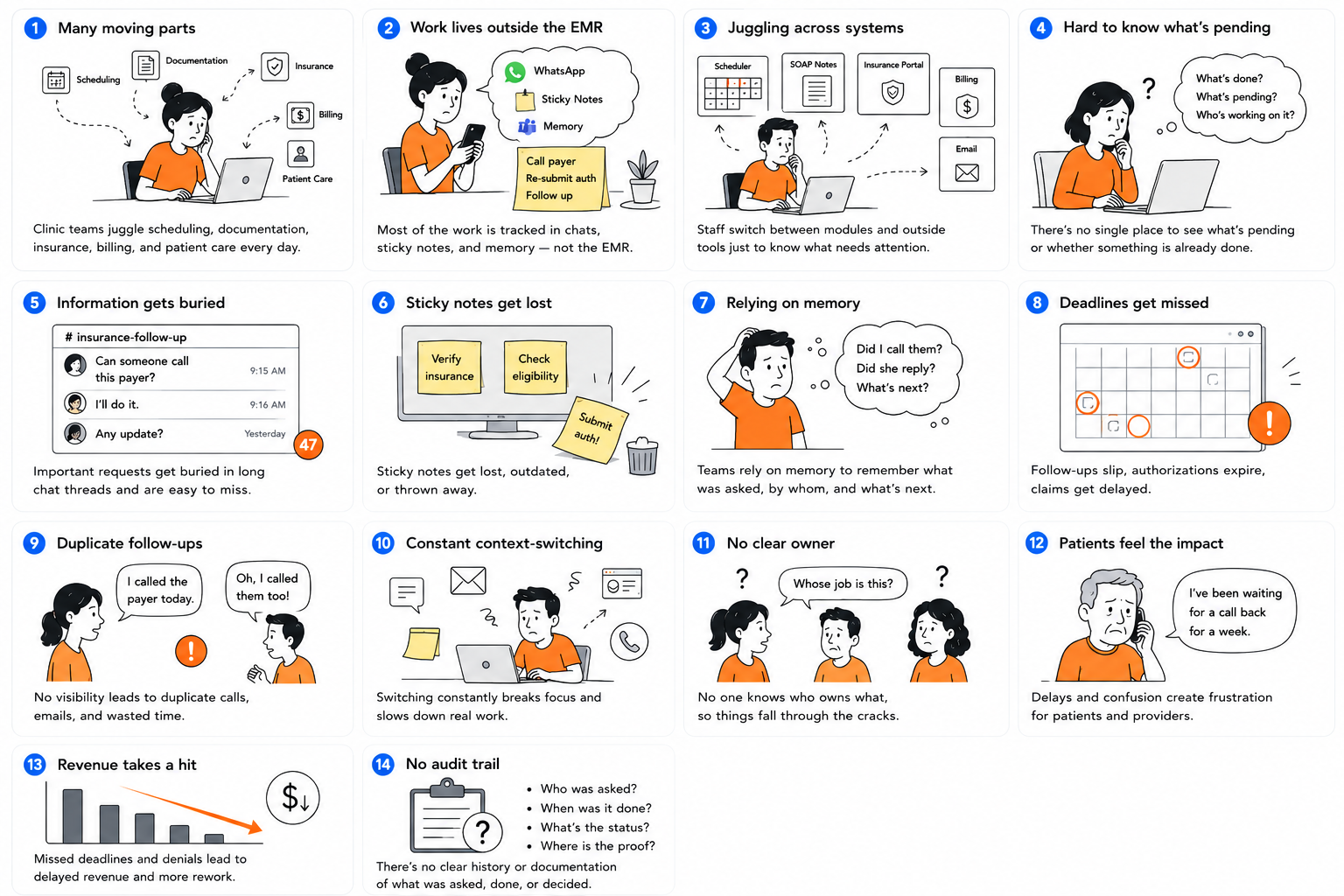
Clinic teams coordinate across scheduling, documentation, insurance, billing, and patient care — but most of that work was tracked in chats, sticky notes, and memory, not the EMR. Staff switched between modules and outside tools just to know what needed attention or whether something was done.
The result: missed deadlines, duplicated follow-ups, constant context-switching, and no clear answer to “whose job was that?”
Constraints
Had to fit existing clinic workflows instead of changing how staff worked.
Designed and shipped an MVP in just two weeks to meet an enterprise go-live deadline.
Supported five user roles with distinct responsibilities and permissions.
Metrics
Increase adoption of task management across clinic teams.
Increase repeat usage of the Task Dashboard.
Increase the percentage of tasks completed before their due date.
Design strategy
Place creation where it protects revenue
Task creation belonged where it would catch revenue-critical work — not everywhere it was convenient to add.
Four decisions that shaped the MVP
One owner, fast
Shared ownership was the real risk. A task shared across a team had to resolve to a single owner quickly, or work slips.
Defaults beat configurability
Fewer states, fewer clicks. The moment something feels like extra work, front desk staff stop using it.
Retention, not trial
Getting people to try it once wasn't the bar. The system had to earn a place in the daily rhythm.
Fastest paths to real signal
I chose the fastest paths to real signal: Secondary research on US PT clinic operations, a structured audit of six competitor systems, and direct conversations with Customer Success and the clinical training team — the two groups carrying clinics’ complaints daily. Depth traded for speed, deliberately.
Research
Finding 1
How work gets assigned today
Small clinics (2–5 staff): verbal handoffs and whiteboards work because everyone hears everything.
Medium clinics (6–20): spreadsheets and manual check-offs — still just people checking on people.
Most clinics have no real assignment system. Ownership is unwritten, learned socially, and only reinforced when something goes wrong.
Finding 2
Where it breaks down, concretely
Work stayed invisible outside the person doing it; tasks went unowned by default; urgent looked the same as routine.
Problems surfaced weeks late instead of immediately.
The fix pattern that kept recurring: let a task go to a role, let anyone in that role claim it, and keep status obvious throughout — unclaimed, in progress by someone specific, or done.
Finding 3
Clinics already have a daily rhythm
Trust mattered more than control in every conversation.
Defaulting the dashboard to “what’s due today” wasn’t a new habit — it put a rhythm clinics already trusted into the product.
Where user intent and business need diverged
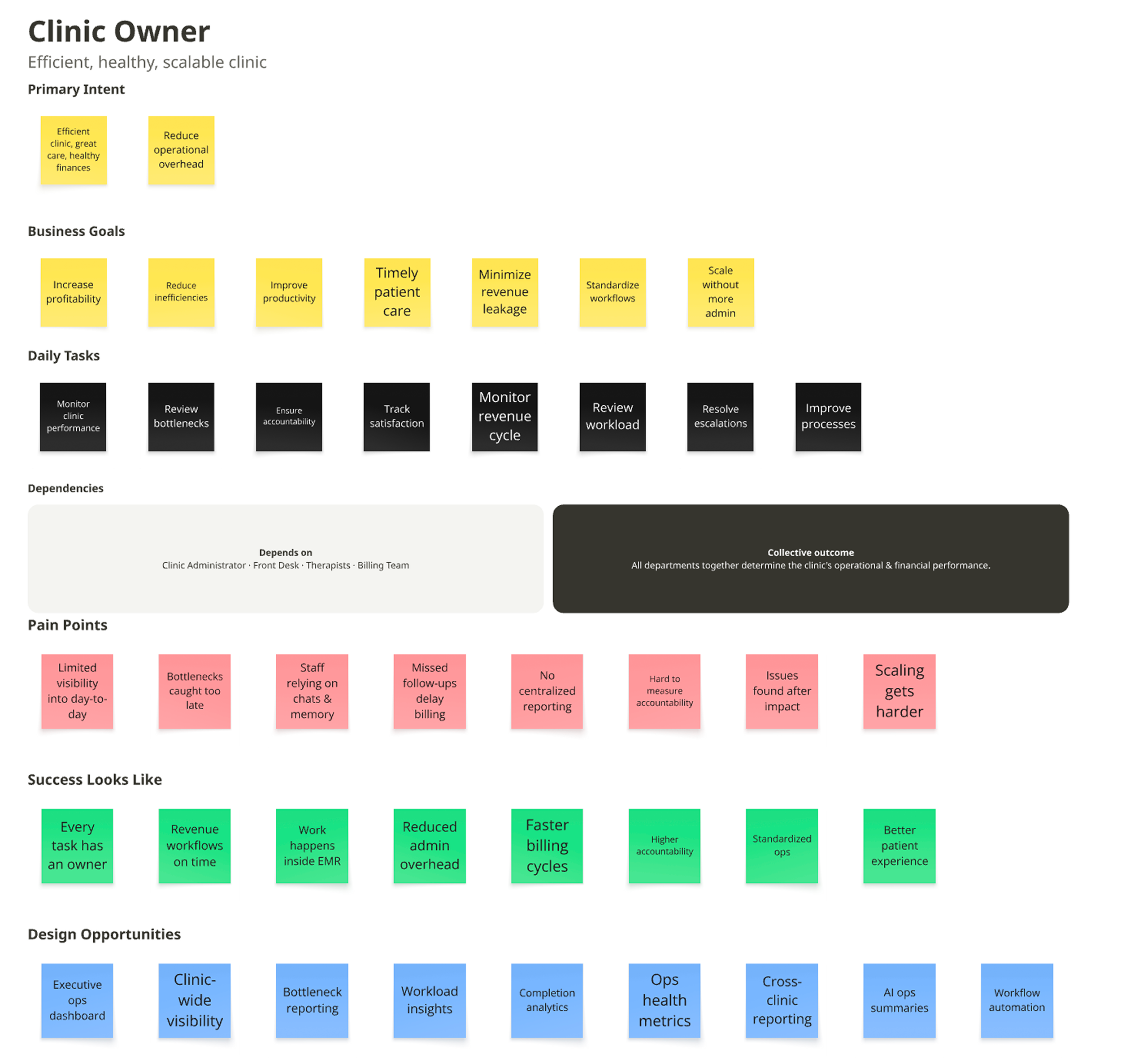
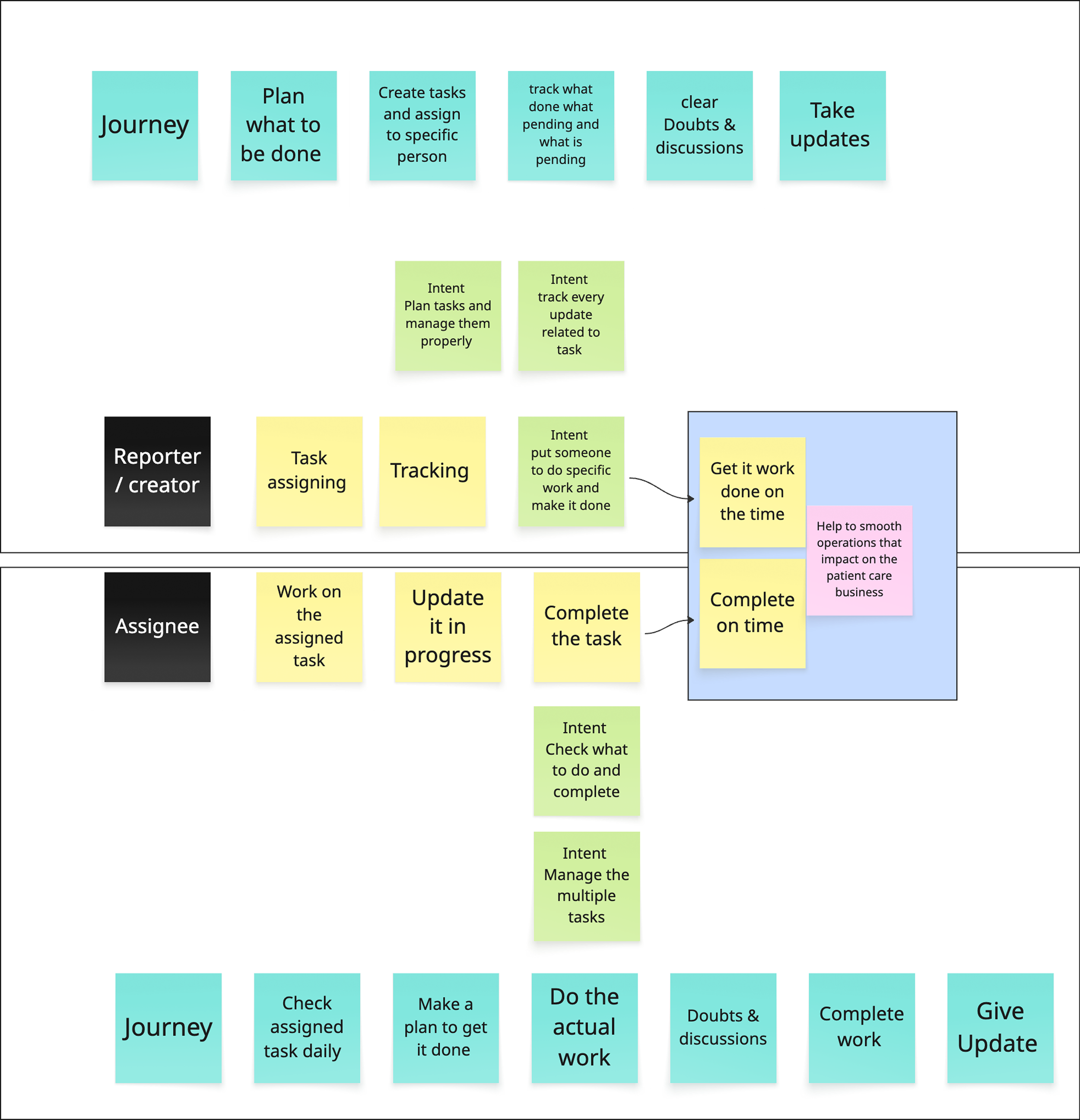
Mapped six roles across the task lifecycle — not what they do, but what they're trying to accomplish, and whether that matches what the business needs from that step. Where the two diverged, design had to close the gap.
Analysis
Tracking vs. execution
Reporters need visibility, what's pending, what's cleared. Assignees need focus , what to check, what to complete. Same task, two different jobs. My Tasks and Assigned by Me came from this split.
Ownership vs. work distribution.
Billing gets blocked on a SOAP note any PT could close. A denial lands in Front Desk's queue but only the Biller can resolve it. Forcing one named owner doesn't match how the work moves. Role-based claiming became a requirement, not a preference.

Use cases & workflows
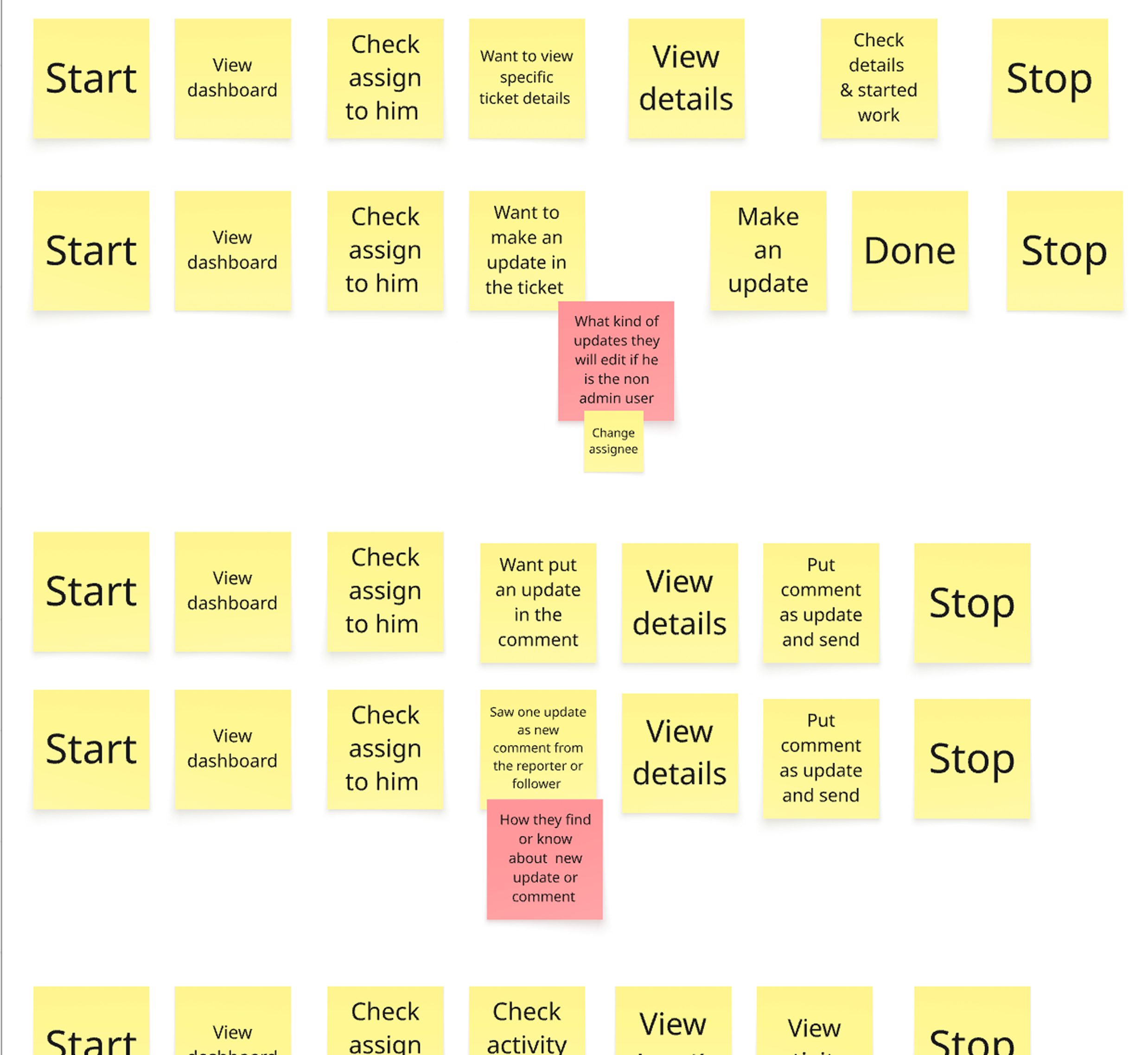
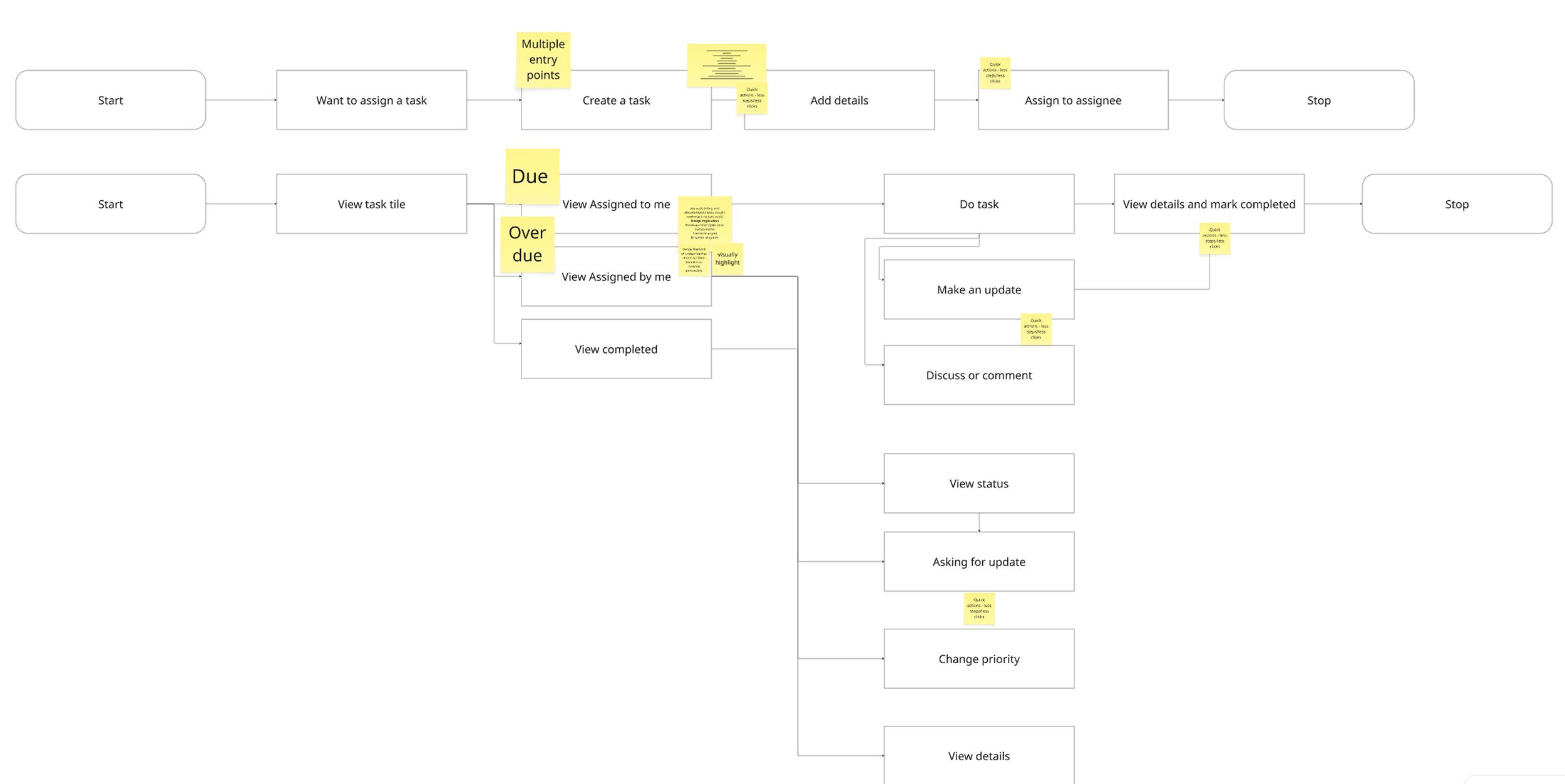
Persona intent maps produced a long list of possible use cases. Sitting with the PM, we cut it to what a two-week MVP could ship without breaking: the create → assign → update → complete loop, across two entry points — the dashboard tile and a persistent task bar.
The scoped-in list:
Create task (Reporter, from dashboard or bar)
Assign to a role or a specific person
Update in progress (Assignee)
Comment, mark blocked, or escalate
Complete with a mandatory reason
Review closed work (Reporter, via Assigned by Me)
Everything downstream — task automation, cross-clinic reporting, escalation rules — got parked for phase 2.
Scope
Final solution
Flow 1
Create & assign task
Final solution
Flow 1
Create & assign task
Two entry points, for the two moments people actually need this
One entry point — just the dashboard tile — meant tasks were only visible at login. Anyone deep in another module mid-shift had no way to check or create one without losing their place. So I added a persistent task bar on every screen: one as the first moment of visibility at login, one as an always-there fallback for the interruption mid-shift.
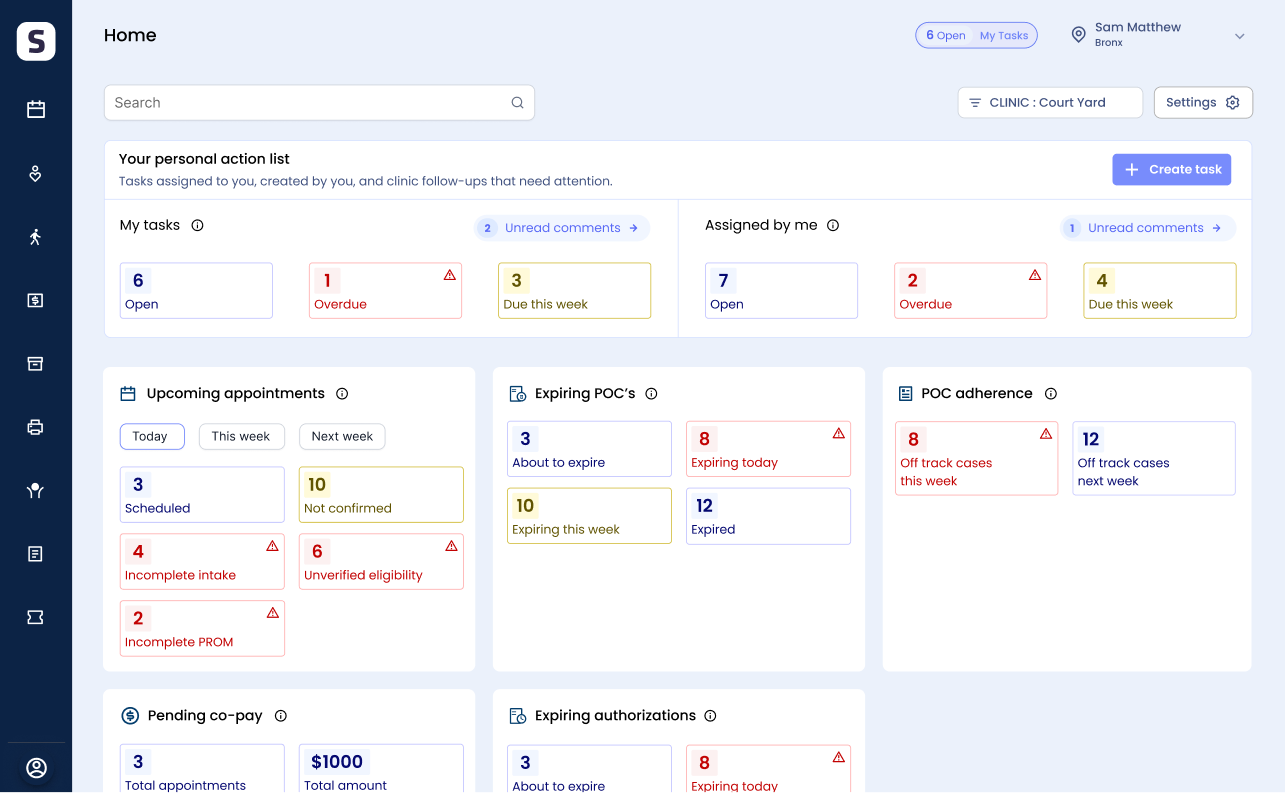
Dashboard tile placed first at login — task visibility is the first thing seen, not buried among other tiles.
A feature only builds habit if it’s always reachable — this directly de-risked adoption.

Persistent bar badge (e.g. “6 Open · My Tasks”) on every screen opens a slider with the full list and a Create Task action — no navigating away.
Trade-off rejected: scattering “create task” into every module. Too many touchpoints, too much dev effort, no clear place to stop. One fixed entry point solved it cheaper.
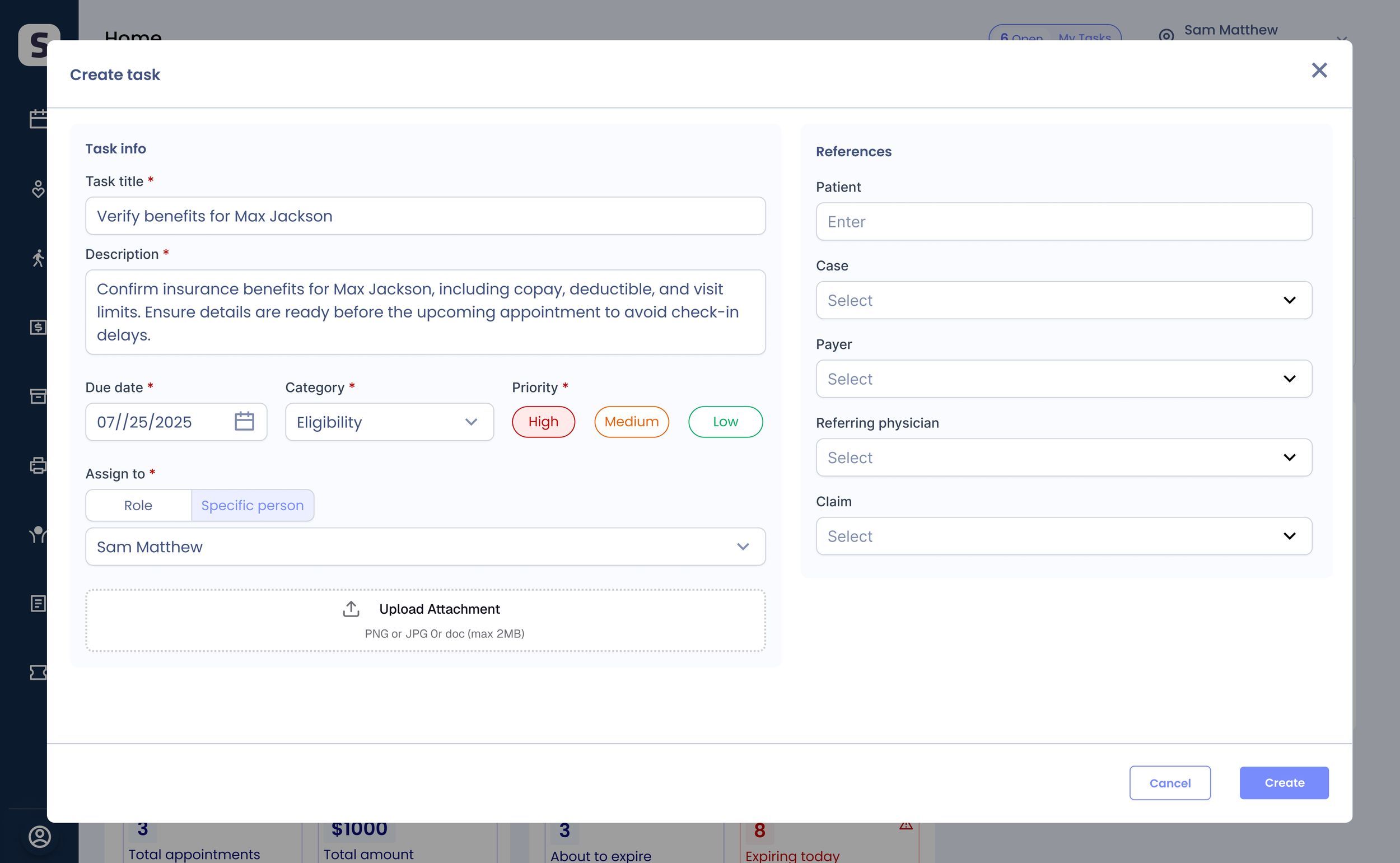
One modal holds all context — Task Information + References — so a task is created in one place.
Required description and due date guarantee every task is actionable; categories (Eligibility, Authorization, Intake) organize common workflows; new tasks land in the creator’s Assigned by Me instantly.
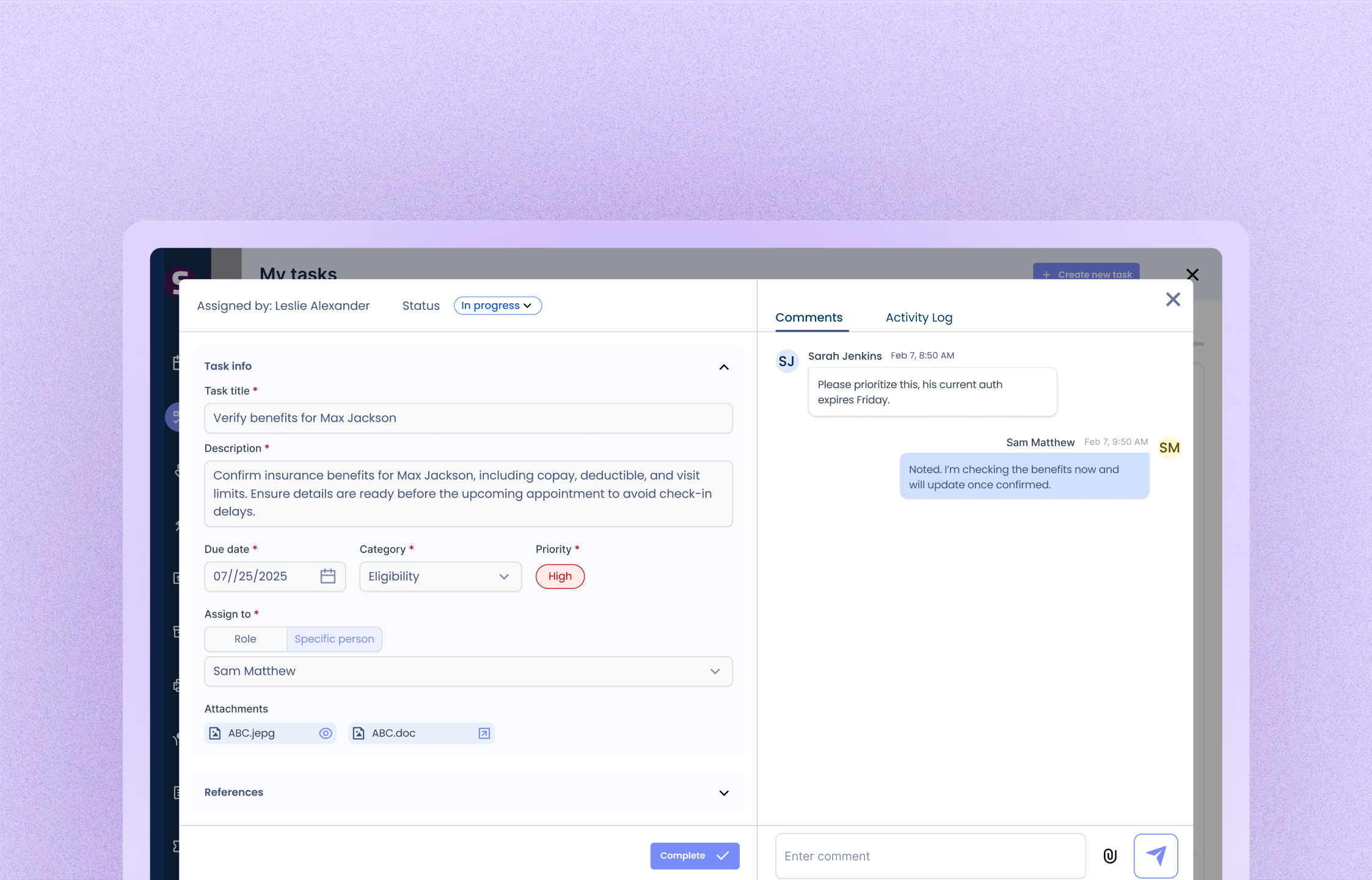
Initiate task & view details
A user opens their task list, picks a task, and sees everything they need — status, priority, who's involved, and the conversation around it. From there they can update it, comment, or mark it done.
Flow 2
Same data, two jobs: one view to execute, one to oversee
The tracking-vs-execution divergence became two views. My Tasks is for doing the work — what to check, what to complete. Assigned by Me is for delegation and oversight — what’s pending, what’s cleared. Splitting them cut cognitive load and made accountability legible.
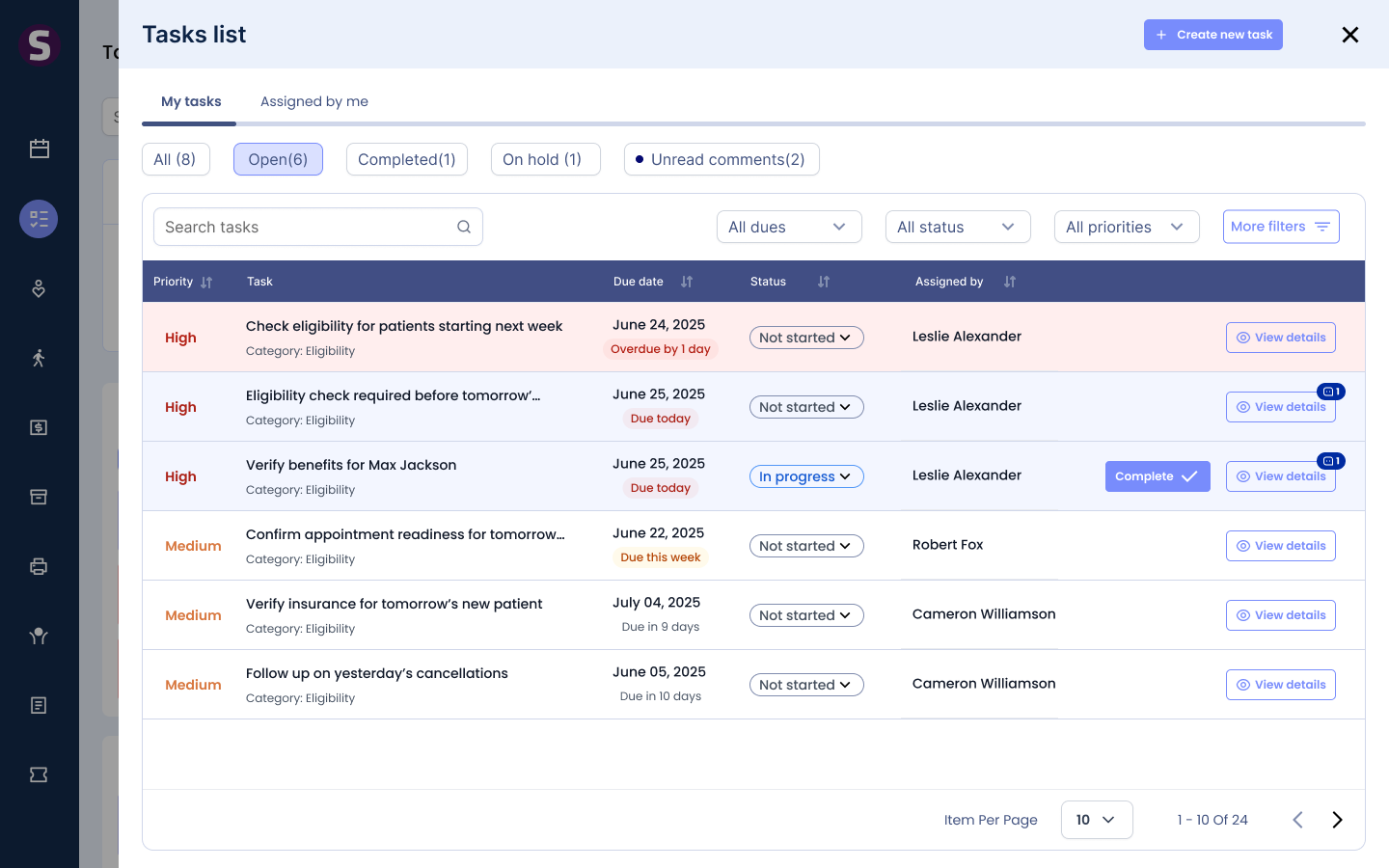
Both use the same table structure — learn one, know both.
Tabs — All, Open, Completed, On Hold, Unread Comments — give quick access. With no notification system in the MVP, Unread Comments does that job: it surfaces updates before they’re missed.
Search, filters, and sorting by workflow attributes (priority, category, due date, status, assignee) match how staff scan at volume and bring revenue-critical work forward.
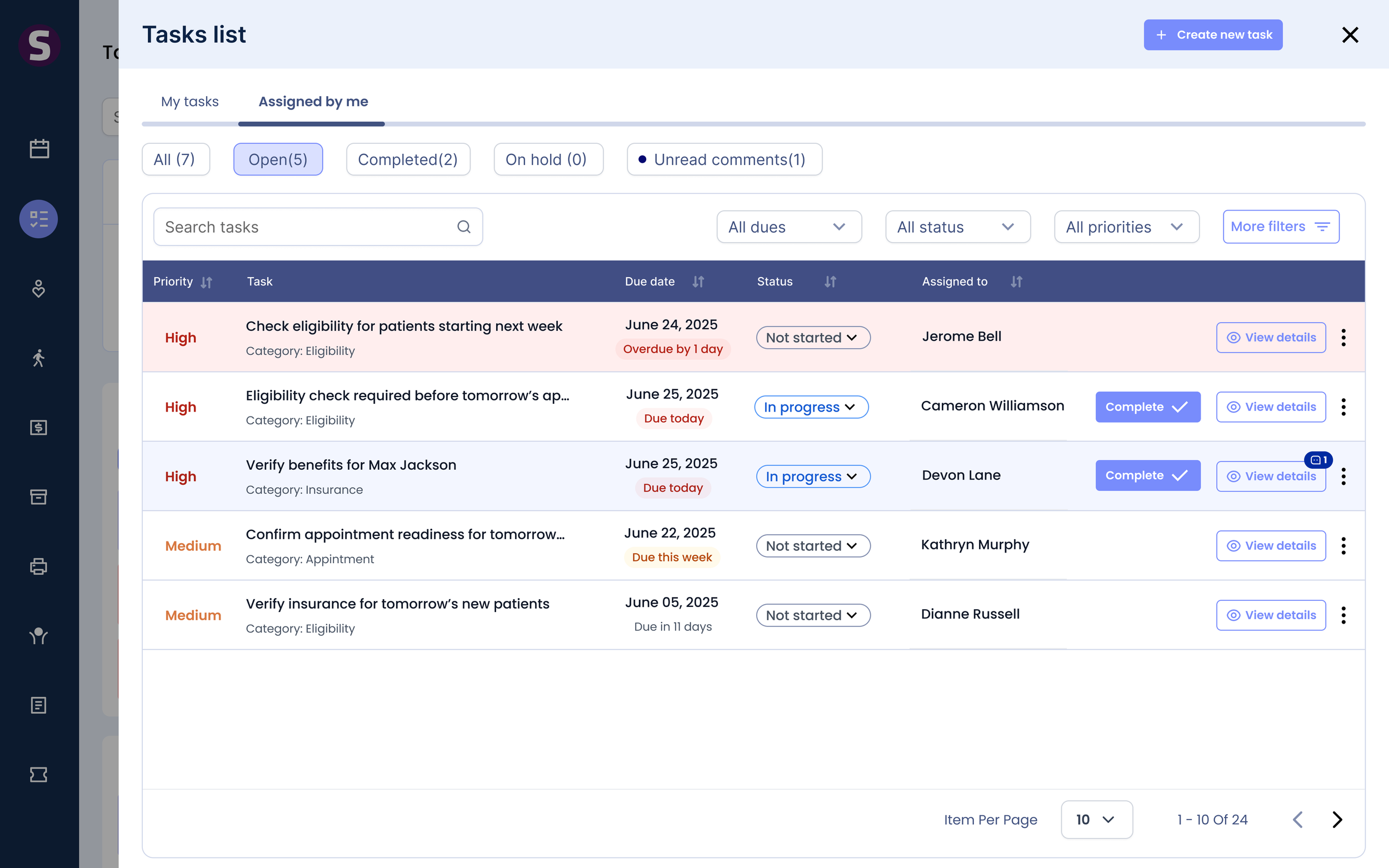
Relative labels (Overdue, Due Today, Due This Week) show urgency at a glance; calendar dates give precision.
Color reserved for priority, overdue, unread, and completed — key signals stay visible without noise.
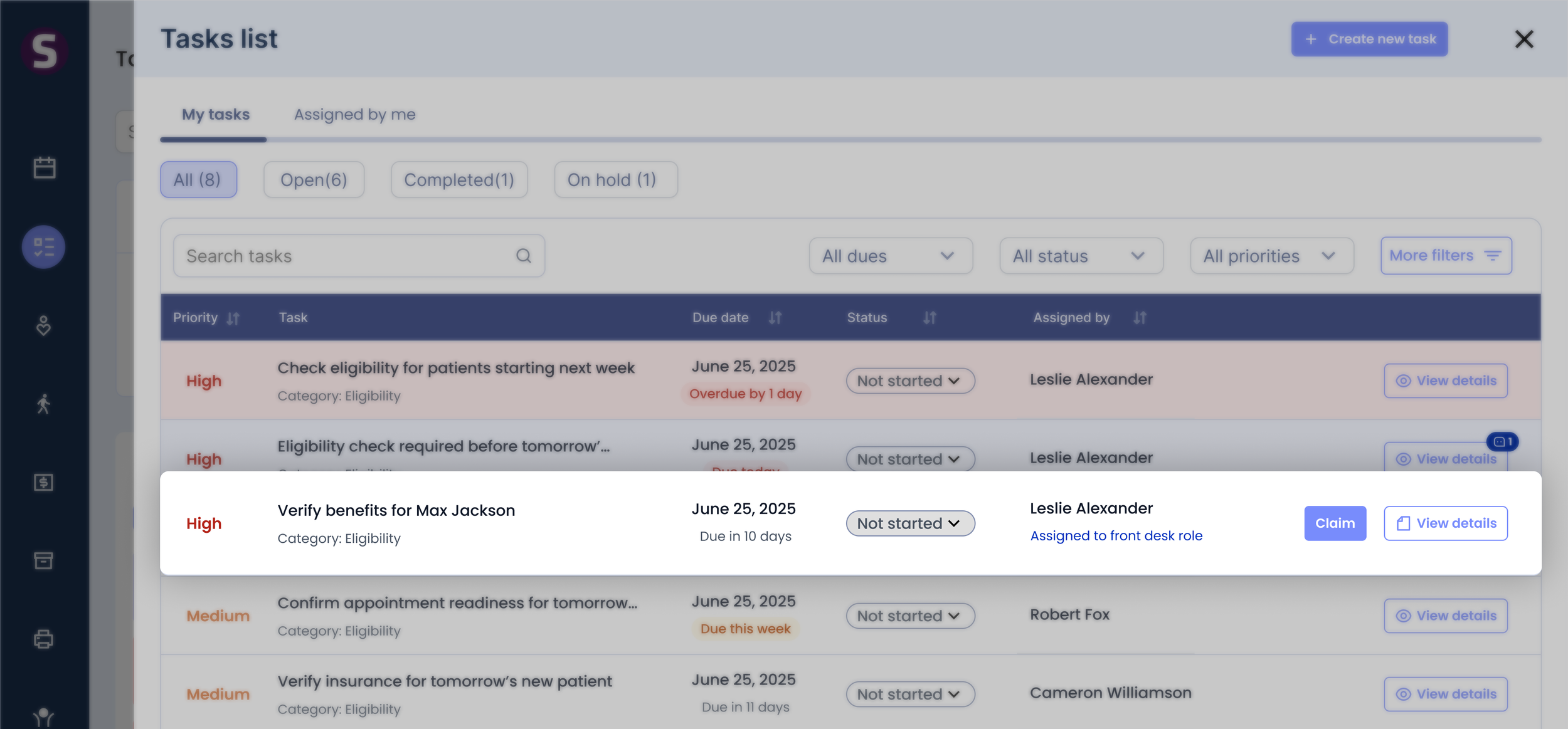
Assign to a role, let anyone claim it, resolve to one owner
Many clinic workflows belong to a team, not a person. A task assigned to a role (Front Desk, Therapist, Billing) is visible to everyone in it — and the moment someone claims it, ownership becomes individual and locked. Team visibility without the “first to grab it” chaos.
A role-based task stays Not Started until claimed. Claiming moves it to Work In Progress and locks ownership, creating a clear audit trail.
Gives the right team immediate visibility while preventing duplicate work.
Supports both role-based and individual assignment — visibility into unclaimed team work and individually owned work, side by side, for scalable clinic ops.
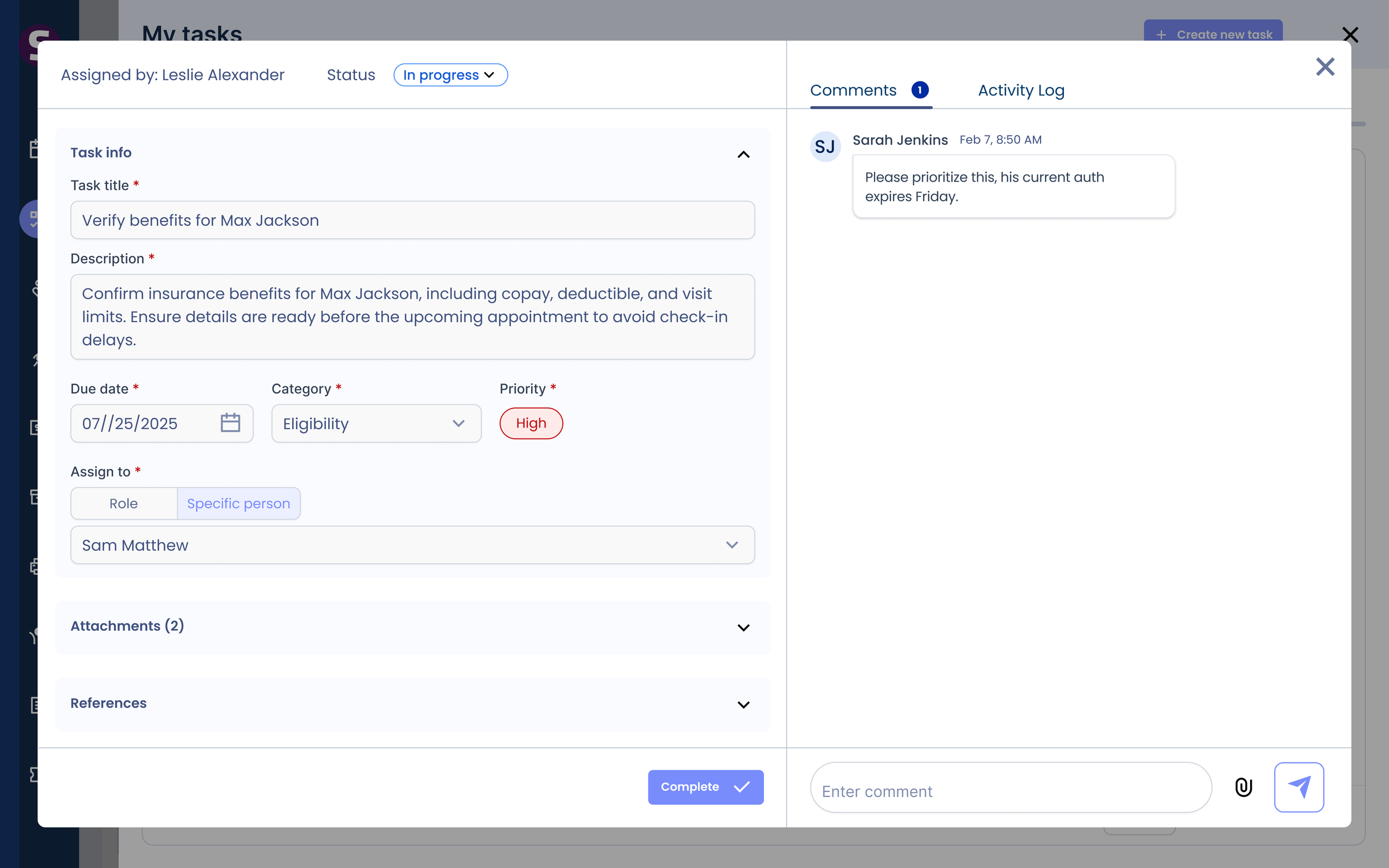
The PM proposed exposing separate actions in the list; I consolidated into one View Details modal to cut table complexity and navigation overhead. Role-based permissions — reporters define, assignees execute — prevent accidental edits.
A single contextual workspace — details, collaboration, history, and actions in one place instead of scattered across the table.
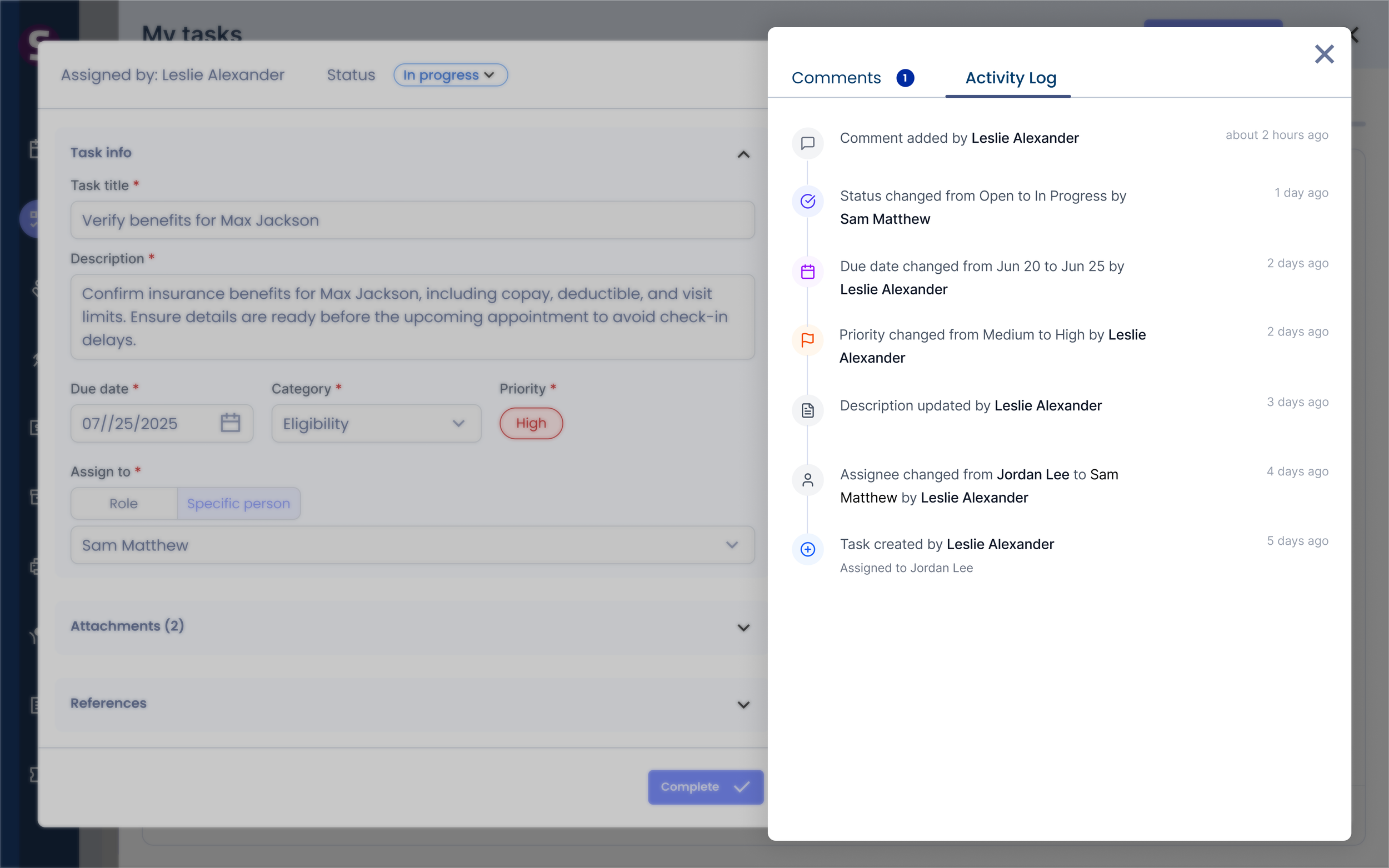
Every task update captured automatically — a complete audit trail of who changed what, when.
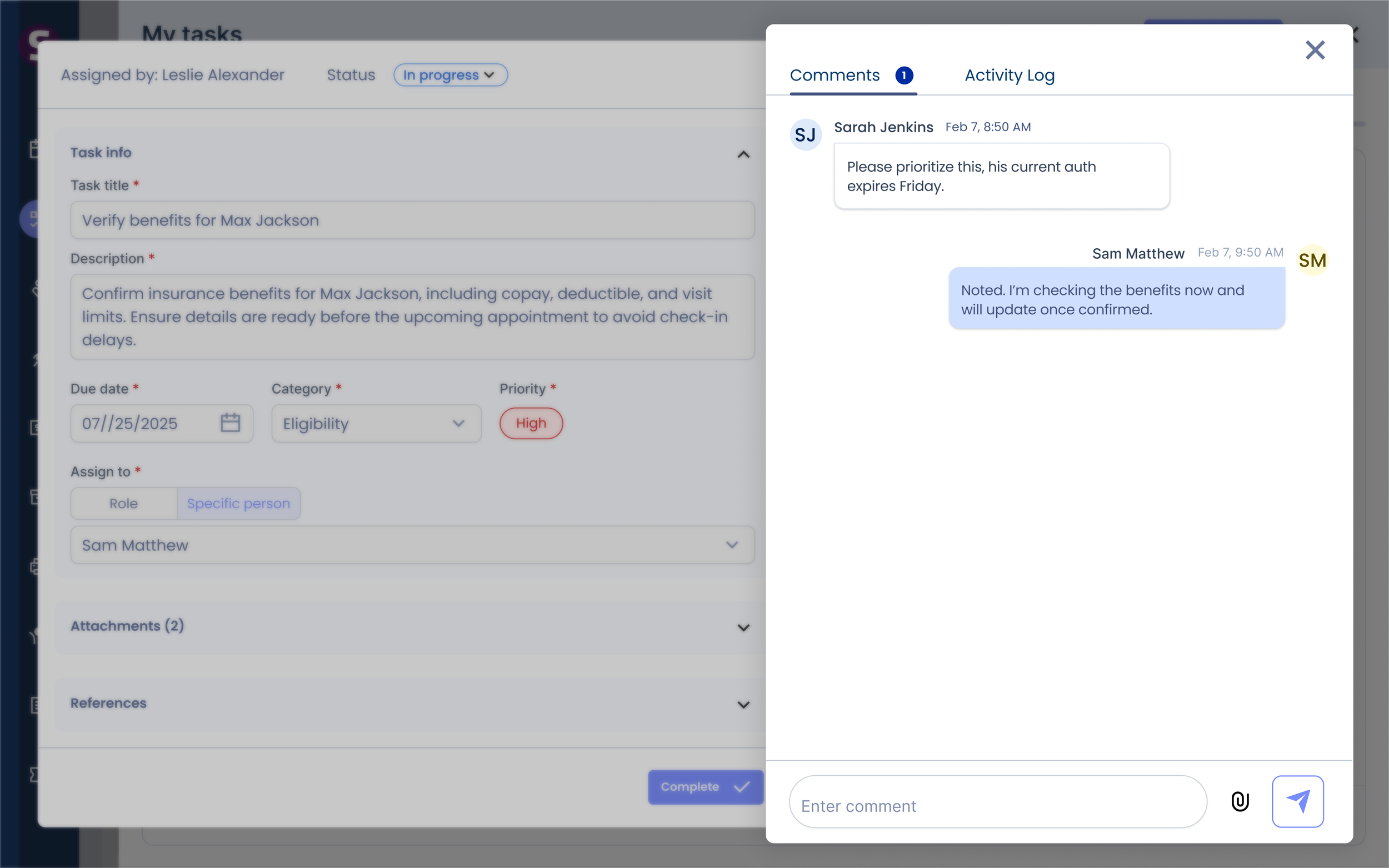
First-class collaboration, not simple notes — operational discussion stays inside the EMR instead of scattering across chat and email.
Complete task
Whether it was assigned to one person or shared across a role, completing it works the same way
Flow 3
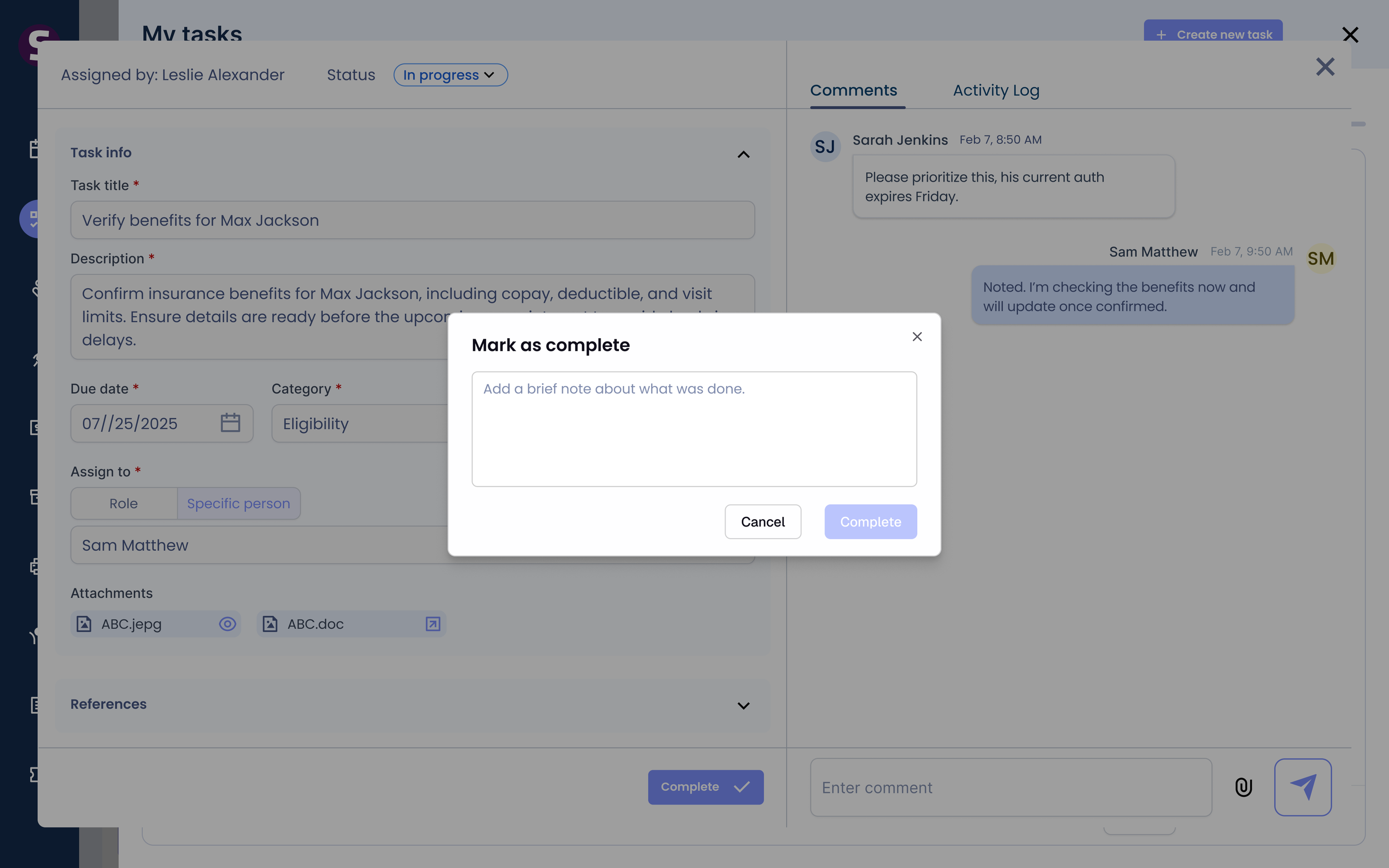
You can’t close a task without saying what you did
Marking something “done” doesn’t explain what happened. I required a completion reason before any task closes — preserving execution context, cutting follow-up conversations, and keeping a real audit trail for healthcare operations.
Works identically whether the task was individually assigned or claimed from a role.
Completed tasks move to the Completed tab automatically, still accessible in All to both creator and assignee.
Gives creators and assignees a shared view of finished work — accountability, transparency, auditability.
What changed once 100 clinics ran it in beta
Outcome
61%
Clinics adoption
1342
Tasks created
134%
Growth in weekly task volume (after first 2 weeks)
2x
Increase in weekly active users.
Adoption, habit, and whether revenue-critical work got seen sooner.